Loading
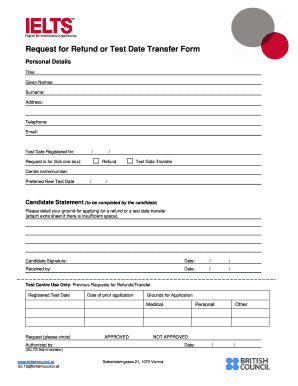
Get At Ielts Request For Refund Or Test Date Transfer Form
How it works
-

Open form follow the instructions
-

Easily sign the form with your finger
-

Send filled & signed form or save
How to fill out the AT IELTS Request for Refund or Test Date Transfer Form online
Completing the AT IELTS Request for Refund or Test Date Transfer Form is essential for individuals looking to request their refund or change their test date. This guide provides step-by-step instructions to ensure that users can efficiently fill out the form online.
Follow the steps to complete your form with ease.
- Click ‘Get Form’ button to obtain the form and open it in the editor.
- Begin by entering your personal details. Fill in your title, given names, surname, address, telephone number, and email address accurately to ensure proper identification.
- Indicate the test date you are registered for in the specified field.
- Specify your request by ticking one of the boxes provided, either 'Refund' or 'Test Date Transfer'.
- Input the centre name or number where you registered for your test.
- If you are requesting a test date transfer, provide your preferred new test date in the designated field.
- In the Candidate Statement section, clearly detail your reasons for requesting a refund or a test date transfer. If additional space is needed, attach an extra sheet with your statement.
- Sign and date the form to confirm your request.
- After completing all required fields, review your form for any inaccuracies or missing information.
- Finally, save your changes, and choose to download, print, or share your completed form as needed.
Ensure your request is processed by completing the AT IELTS Request for Refund or Test Date Transfer Form online today.
To get a refund from IELTS, you need to fill out the AT IELTS Request for Refund or Test Date Transfer Form. This form is crucial in processing your request efficiently. Ensure that you provide all required details and submit your request as per the guidelines shared by IDP.