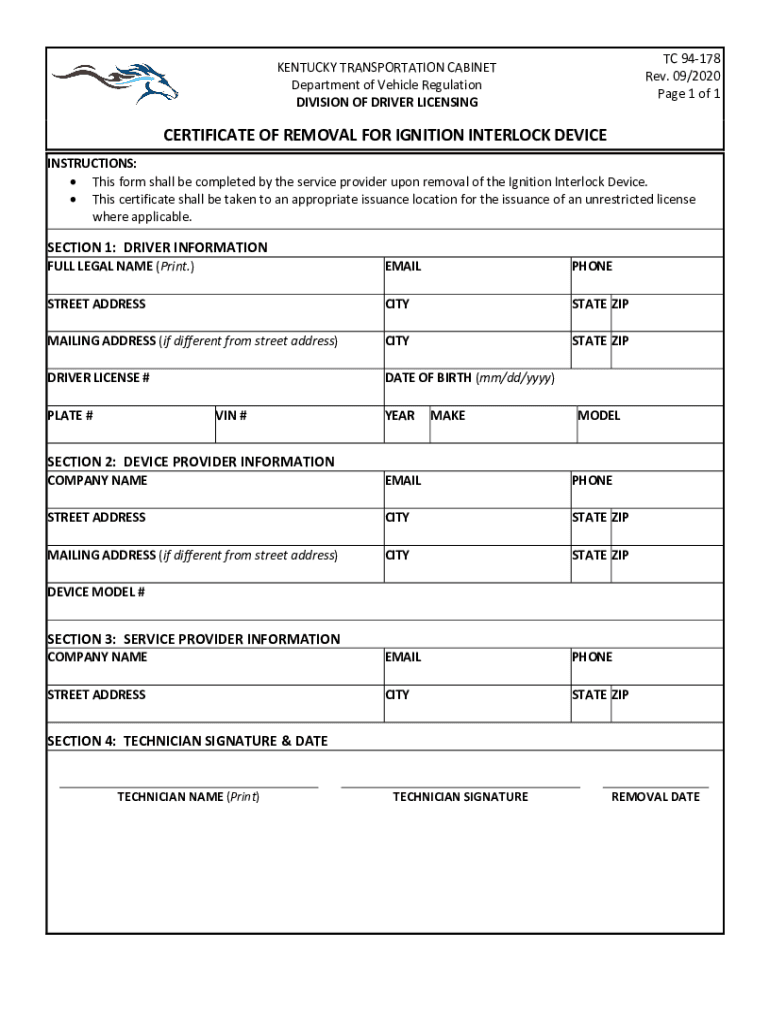
Pon removal of the Ignition Interlock Device. This certificate shall be taken to an appropriate issuance location for the issuance of an unrestricted license where applicable. SECTION 1: DRIVER INFORMATION FULL LEGAL NAME (Print.) EMAIL PHONE STREET ADDRESS CITY STATE ZIP MAILING ADDRESS (if different from street address) CITY STATE ZIP DRIVER LICENSE # DATE OF BIRTH (mm/dd/yyyy) PLATE # VIN # YEAR MAKE MODEL SECTION 2: DEVICE PROVIDER INFORMATION COMPANY NAME EMAIL PHONE.
Loading

Open form follow the instructions

Easily sign the form with your finger

Send filled & signed form or save
How to fill out the KY TC 94-178 online
Filling out the KY TC 94-178 form online is a crucial step in the process of removing an ignition interlock device. This guide will provide you with step-by-step instructions to ensure you complete the form accurately and efficiently.
Follow the steps to complete the KY TC 94-178 form online.
- Press the 'Get Form' button to access the form and open it in an online editor.
- In 'Section 1: Driver Information', enter your full legal name, email address, phone number, street address, city, state, and ZIP code. If your mailing address is different from your street address, provide that information as well. Next, include your driver license number, date of birth in the format mm/dd/yyyy, plate number, VIN number, year, make, and model of your vehicle.
- Move to 'Section 2: Device Provider Information'. Fill in the company name of the service provider that installed the ignition interlock device, along with their email, phone number, and street address. Again, if the mailing address differs, provide those details too. Include the company's name one more time and enter the device model number.
- Proceed to 'Section 3: Service Provider Information'. This section may require further details about the service provider. If instructed, fill out any applicable fields to comply with the requirements.
- In 'Section 4: Technician Signature & Date', ensure the technician prints their name, signs the document, and dates the removal of the device accurately.
- After completing all sections, review the form for any errors or omissions. Make any necessary corrections.
- Once the form is completed and reviewed, save your changes. You can then download, print, or share the completed form as necessary.
Complete your Kentucky TC 94-178 document online today for a seamless experience.
Experience a faster way to fill out and sign forms on the web. Access the most extensive library of templates available.
Related content
TC 94-28. New System Application for Renewal or Duplicate License by Mail (Military...
by V Dang · 2012 · Cited by 3 — ... 94/178. 1994. Walters, D. M.; Fritz, K. M. ... Ky...
Oct 19, 2012 — INSTRUCTIONS: Return the completed form along with any necessary...
Get answers to your most pressing questions about US Legal Forms API.
What counts as proof of residency in KY?
A utility bill from your home, a tax return, or a signed lease or deed can prove residency.
What is needed for REAL ID in KY?
To apply for a new REAL ID , applicants should bring in the following: One (1) valid proof of identity. One (1) valid proof of Social Security number. Two (2) valid proofs of residency. Proof of all legal identity changes (if applicable) Additional documentation may be required for minors (see GDLP)
Use professional pre-built templates to fill in and sign documents online faster. Get access to thousands of forms.
If you believe that this page should be taken down, please follow our DMCA take down process here.