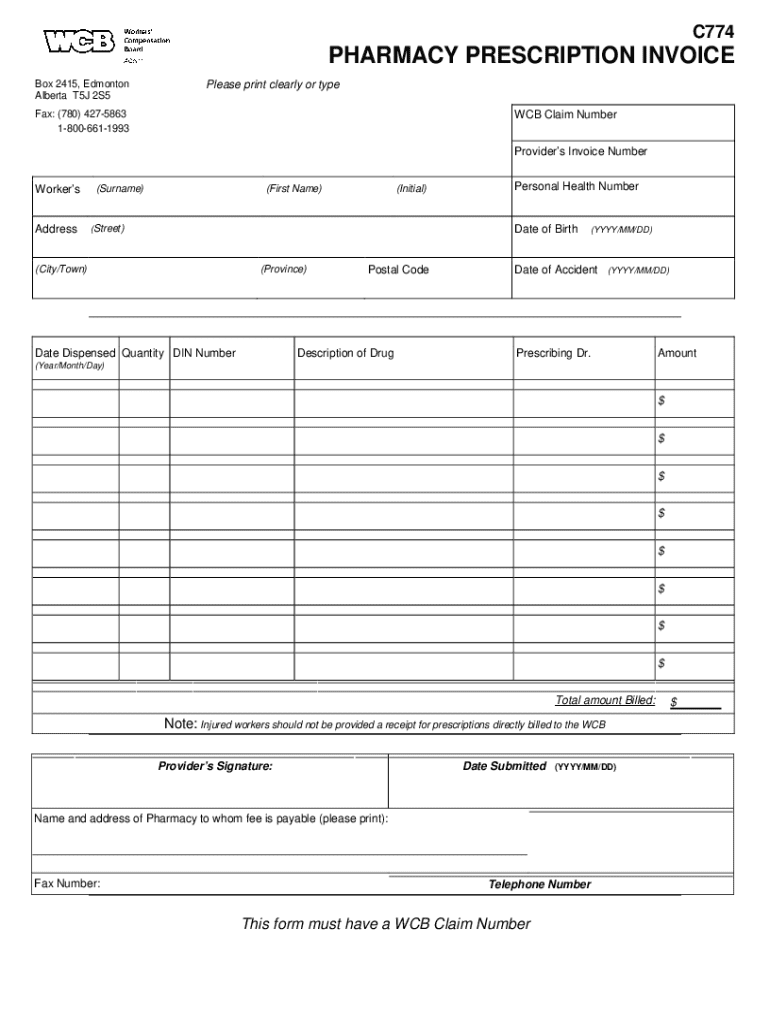
Www.wcb.ab.ca This package will provide you with all the information required to obtain authorization, prepare and submit claims, and satisfy any questions you may have. Authorization of prescriptions and medical supplies WCB is committed to covering the costs of prescriptions and medical supplies associated with a work-related injury or illness. Authorization for these costs should be received prior to dispensing these items, and can be obtained through the Claims Contact Centre at one of the.
Loading

Open form follow the instructions

Easily sign the form with your finger

Send filled & signed form or save
How to fill out the Canada C774 online
The Canada C774 form is essential for submitting pharmacy prescription invoices related to work-related injuries or illnesses. This guide will provide you with a clear, step-by-step approach to completing the form online, ensuring you can efficiently manage your claims.
Follow the steps to accurately complete the Canada C774 form.
- Click the ‘Get Form’ button to obtain the form and open it in your preferred editing tool.
- Begin by entering the WCB claim number at the top of the form. This number is crucial for processing your claim.
- Fill in the provider’s invoice number to ensure proper tracking and payment of your claim.
- Complete the worker's information section with their full name, address, personal health number, and date of birth.
- Input the details for each prescription dispensed, including the date dispensed, quantity, Drug Identification Number (DIN), and description of the drug.
- Record the date of the accident as well as the prescribing doctor’s name in the designated fields.
- List the amounts billed for each drug, ensuring that the total amount billed is clearly indicated at the bottom of the form.
- Sign and date the form, then provide the name and address of the pharmacy to whom the fee is payable, along with their fax and telephone number.
- Review all information for accuracy before submitting. Save the changes, and consider downloading or printing a copy for your records.
- Submit the completed form either by fax or mail as per the provided instructions.
Complete your Canada C774 form online today to ensure your claims are processed swiftly.
Experience a faster way to fill out and sign forms on the web. Access the most extensive library of templates available.
Related content
4(P2RX2):c.774+7C>G. Cite. Following Follow ... First in ClinVar: May 29, 2016. Last...
... Canadian Aboriginal Syllabics in U+1401..U+1676. This ... 2016: # OCLC Technical...
CA Technologies Canada, CA API Gateway ... RSA 2060, 7/31/2016. SHS 3313, 7/31/2016...
Use professional pre-built templates to fill in and sign documents online faster. Get access to thousands of forms.
If you believe that this page should be taken down, please follow our DMCA take down process here.