Ue out-of-pocket spending (“TrOOP”) under Part D of the Medicare program or any other prescription drug plan. I further agree that I will seek no reimbursement for any drugs obtained under this program. Applicant Declaration Regarding Change in Insurance Coverage: I understand that ACI policy requires individuals with access to medicines through an affordable benefit to seek access through that benefit. As such, I promise that I will notify Alcon Cares, Inc. within 30 (thirty) days by mail a.
Open form follow the instructions
Easily sign the form with your finger
Send filled & signed form or save
How to fill out the Alcon Cares Application online
The Alcon Cares Application is designed to assist individuals in obtaining necessary medications at no charge. This guide provides a comprehensive, step-by-step approach to filling out the application form online, ensuring that users can navigate the process smoothly and successfully.
Follow the steps to complete the Alcon Cares Application online.
- Press the ‘Get Form’ button to acquire the Alcon Cares Application and open it in the designated editor.
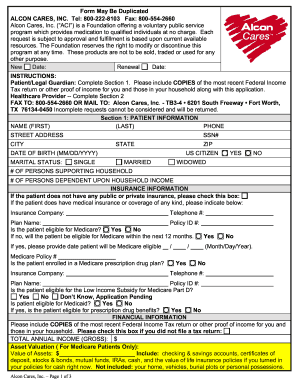
- Begin by completing Section 1, which includes your personal information. Fill in your name, phone number, street address, city, state, ZIP code, date of birth, social security number, and marital status. Indicate the number of individuals in your household and how many depend on that income.
- In the next subsection, provide relevant insurance information. If you do not have insurance, check the corresponding box. If you do, list the insurance company name, contact telephone number, policy ID number, and the plan name. Indicate your eligibility for Medicare and provide any necessary details.
- Fill out the financial information accurately. Include your total annual income and verify any assets if applicable. Attach copies of your most recent Federal Income Tax return or other proof of income.
- Sign the Patient Authorization section to allow your prescribing physician to release your health information to Alcon Cares. Make sure you agree to all declarations regarding incurred drug expenses and insurance coverage changes.
- Proceed to Section 2, where your healthcare provider will need to complete their details, including the therapeutic license number, facility information, and the products being requested. The provider must also sign to confirm the accuracy of the information provided.
- After completing all sections, review your application for completeness and accuracy. Save your changes, and then either download the application, print it, or share it, as needed.
Complete your application online today to secure your medication needs through the Alcon Cares program.
Experience a faster way to fill out and sign forms on the web. Access the most extensive library of templates available.
Related content
Apply For A Job · Apply For A Marriage License · Apply For A Passport · Search for...
Feb 1, 2018 — The Alcon Foundation Board renewed a grant in support of the Alcon...
The program is designed to help increase revenues within your facility. Based on research...
Get answers to your most pressing questions about US Legal Forms API.
Who is eligible for the patient assistance program?
Eligibility for the patient assistance program typically includes individuals who meet specific income criteria and do not have insurance or are under-insured. Through the Alcon Cares Application, you can verify if you qualify based on your situation. This program is designed to help those who have difficulty accessing their needed medications.
Is there help paying for Rhopressa?
Yes, assistance is available for those needing help paying for Rhopressa. You can apply through the Alcon Cares Application to see if you qualify for financial support. This program can significantly reduce your out-of-pocket expenses and provide the medication you need.
How do I activate my Alcon card?
To activate your Alcon card, visit the official Alcon Cares Application website and follow the provided instructions. You will need to enter your card details and complete a brief verification process. Once activated, you can start enjoying the benefits of your card immediately.
What is the glaucoma patient assistance program?
The glaucoma patient assistance program focuses specifically on helping patients manage their glaucoma treatments. By utilizing the Alcon Cares Application, you can discover options available for accessing medications like Rhopressa. This dedicated support streamlines the process of obtaining necessary medications, ensuring that you stay on top of your eye health. Therefore, it's a valuable resource to consider.
Does insurance cover Rhopressa?
Insurance coverage for Rhopressa may vary by plan. It's important to check your specific insurance policy to see what it covers and what costs you might incur. However, even if your insurance does not fully cover Rhopressa, the Alcon Cares Application can help you find financial assistance options. This support might make your treatment more affordable.
What is a substitute for Rhopressa?
If you're looking for alternatives to Rhopressa, it's important to discuss this with your healthcare provider. They can suggest other medications depending on your specific needs and health conditions. Additionally, some patients have found that the Alcon Cares Application can help explore more affordable treatment options that may suit you. It’s wise to consider all your choices before making a decision.
How do I submit my Alcon rebate online?
To submit your Alcon rebate online, navigate to the official rebate submission portal found on the Alcon website. There, you will be prompted to enter your information and upload necessary documentation. For a smoother experience, consider using the Alcon Cares Application, which may offer an easier submission process.
How do I activate my Alcon rebate card?
Activating your Alcon rebate card is usually a straightforward process. You can typically do this by visiting the activation website mentioned on the card or by calling the customer service number provided. If you need additional guidance, the Alcon Cares Application may also assist you with step-by-step instructions.
What is the $200 rebate for Alcon?
The $200 rebate for Alcon typically refers to customer incentives on specific products, such as contact lenses or eye care solutions. This rebate can help you save on essential vision products, making eye care more accessible. Stay updated on these offers through the Alcon Cares Application to capitalize on your savings.
How do I check the status of my Alcon rebate?
To check the status of your Alcon rebate, visit the official Alcon rebate website and follow the instructions provided there. You will need your rebate claim number and some basic information to access your status. Alternatively, using the Alcon Cares Application might streamline this process for you by providing up-to-date information about your rebate.
Use professional pre-built templates to fill in and sign documents online faster. Get access to thousands of forms.
If you believe that this page should be taken down, please follow our DMCA take down process here.