Loading
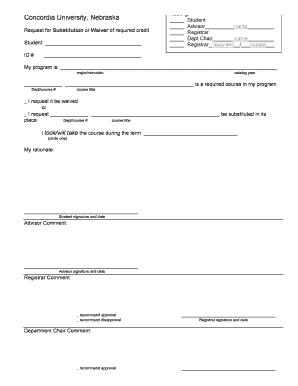
Get Substitution/waiver Form - Concordia University Nebraska - Cune
How it works
-

Open form follow the instructions
-

Easily sign the form with your finger
-

Send filled & signed form or save
How to fill out the Substitution/Waiver Form - Concordia University Nebraska - Cune online
Filling out the Substitution/Waiver Form at Concordia University Nebraska is a streamlined process that allows students to request waivers or substitutions for required courses. This guide provides clear, step-by-step instructions to help you complete the form online.
Follow the steps to successfully fill out the form.
- Click the ‘Get Form’ button to obtain the Substitution/Waiver Form and open it in the editor.
- In the first section, enter your full name and student ID number accurately. This identifies you within the university system.
- Indicate your program of study by filling in the applicable major or minor. Be sure to write the correct catalog year related to your studies.
- In the next section, specify the required course you are requesting to be waived or substituted. Include both the departmental course number and the course title.
- Select whether you are requesting a waiver or a substitution by checking the appropriate box. If you are opting for a substitution, clearly indicate the course title and departmental number of the course you wish to use as a substitute.
- Indicate the term during which you took or plan to take the substitute course by providing the specific term name.
- Provide a rationale for your request in the designated area. This explanation helps the reviewers understand your circumstances.
- Sign and date the form to authenticate your request.
- If applicable, have your advisor add their comments, sign, and date the form as well.
- After your advisor, the registrar and department chair will also review, comment, sign, and date the form as necessary.
- Review the completed form for accuracy, then save your changes. You may also choose to download, print, or share the form as needed.
Complete your Substitution/Waiver Form online today and ensure your academic path is clear.
Request to add, drop, or withdraw from individual classes by submitting this form. ADVISOR (and instructor if applicable) APPROVAL IS REQUIRED BEFORE REGISTRATION Enter todays date, your name, CSP email, and ID. Find your advisor in CSP Connect and discuss with them your course change. Complete the Registration Details.
Industry-leading security and compliance
US Legal Forms protects your data by complying with industry-specific security standards.
-
In businnes since 199725+ years providing professional legal documents.
-
Accredited businessGuarantees that a business meets BBB accreditation standards in the US and Canada.
-
Secured by BraintreeValidated Level 1 PCI DSS compliant payment gateway that accepts most major credit and debit card brands from across the globe.