We use cookies to improve security, personalize the user experience, enhance our marketing activities (including cooperating with our marketing partners) and for other business use.
Click "here" to read our Cookie Policy. By clicking "Accept" you agree to the use of cookies. Read less
Read more
Accept
Loading
Form preview
  • US Legal Forms
  • Form Library
  • More Forms
  • More Multi-State Forms
  • Macquarie Wrap Third Party Online Access: Authorisation Form

Get Macquarie Wrap Third Party Online Access: Authorisation Form

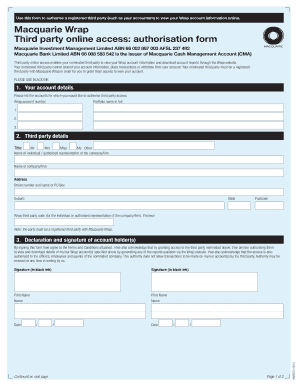
T Management Limited ABN 66 002 867 003 AFSL 237 492 Macquarie Bank Limited ABN 66 008 583 542 is the issuer of Macquarie Cash Management Account (CMA) Third party online access enables your nominated third party to view your Wrap account information and download account reports through the Wrap website. Your nominated third party cannot amend your account information, place transactions or withdraw from your account. Your nominated third party must be a registered third party with Macquarie Wra.

How it works

  1. Open form

    Open form follow the instructions

  2. Easily sign form

    Easily sign the form with your finger

  3. Share form

    Send filled & signed form or save

How to fill out the Macquarie Wrap Third Party Online Access: Authorisation Form online

Filling out the Macquarie Wrap Third Party Online Access: Authorisation Form is a straightforward process. This guide will walk you through each section, ensuring that you complete the form accurately to grant access to your account information.

Follow the steps to authorise third party access to your Wrap account.

  1. Click the ‘Get Form’ button to obtain the form and open it in your selected environment.
  2. In the first section labeled 'Your account details', enter the Wrap account number and the full portfolio name for each account you wish to authorise third party access to. You can list multiple accounts here.
  3. Proceed to the 'Third party details' section. Fill in the title of the individual or the authorised representative, along with their name, and the name of the company or firm, if applicable.
  4. In the same section, provide the address details including the street number, street name or PO Box, suburb, state, and postcode. Include the Wrap third party code if you have it.
  5. Next, move to the 'Declaration and signature of account holder(s)' section. By signing this form, you acknowledge the Terms and Conditions and authorise the nominated third party to view and download your account details.
  6. Sign the form in black ink and print the names of all account holders clearly in the designated spaces. Include the date of signing.
  7. Finally, review all information for accuracy. You can now save your changes, download the completed form, print it for your records, or share it as needed. Ensure that a copy is retained for your personal records.

Complete your Macquarie Wrap Third Party Online Access: Authorisation Form online today to streamline third party access to your account.

Get form

Experience a faster way to fill out and sign forms on the web. Access the most extensive library of templates available.
Get form

Related content

Sticker Supplement
CNL MACQUARIE GLOBAL GROWTH TRUST, INC. STICKER SUPPLEMENT DATED APRIL 26, 2010. TO...
Learn more
Flex-Commissions-Group-Proceeding-Class-Action...
Nov 1, 2011 — CLASS ACTION FREQUENTLY ASKED QUESTIONS - CASL WebThe key feature of a...
Learn more
Wikipedia:Unusual articles
As part of a crackdown on drug cartels in Rio de Janeiro, this uniquely Brazilian form of...
Learn more

Related links form

If We Are So Rich, Why Aren't We Happy 7 Eleven Employee Website Little Caesars Employee Pay Stub Phrasal Verbs List

Questions & Answers

Get answers to your most pressing questions about US Legal Forms API.

Contact support

Bank account signatory An authorized signatory on a bank account is someone who has been authorized to manage someone else's account on behalf of them.

To add an authorized signer to an existing business bank account: Make an appointment to visit the bank. Provide documentation. At the appointment, the authorized signer will need to provide their government-issued photo identification and personal information. Complete the signature card.

What is a third-party authority? A third-party authority is a short-term agreement between you (the 'donor') and someone you trust (the 'third party'). This could be a family member or close friend who can access your bank accounts and pay bills or withdraw money on your behalf.

We can accept some forms that have been electronically signed by the following e-signature providers: Adobe® Sign. Annature. Conga®

Some banks or credit unions also allow you to do it online. Ask to include the person in your savings or checking account. The person must show their proof of identification to the bank and share basic details like birth date and Social Security number.

To set up a new signatory authority on your account, please download and complete the Signatory Nomination form. Once complete, you can send it to us via the instructions on the form. In some situations, we may need to identify the new signatory so we'll require them to provide extra identification documentation.

Simply get in touch with relationship manager designated by the banker for your company. This relationship manager will guide you regarding the process for change in bank account signatory. It is a simple fact that document required by the bank for change in bank account signatory may differ from bank to bank.

If you need to remove a third party from your account, you can complete the relevant third party authority form. For urgent requests, including who has authority on your accounts, you can give us a call on the relevant number below: Macquarie Transaction and Savings Account: 133 174 (+61 2 8245 4470), 24/7.

Get This Form Now!

Use professional pre-built templates to fill in and sign documents online faster. Get access to thousands of forms.
Get form
If you believe that this page should be taken down, please follow our DMCA take down processhere.

Industry-leading security and compliance

US Legal Forms protects your data by complying with industry-specific security standards.
  • In businnes since 1997
    25+ years providing professional legal documents.
  • Accredited business
    Guarantees that a business meets BBB accreditation standards in the US and Canada.
  • Secured by Braintree
    Validated Level 1 PCI DSS compliant payment gateway that accepts most major credit and debit card brands from across the globe.
Get Macquarie Wrap Third Party Online Access: Authorisation Form
Get form
Form Packages
Adoption
Bankruptcy
Contractors
Divorce
Home Sales
Employment
Identity Theft
Incorporation
Landlord Tenant
Living Trust
Name Change
Personal Planning
Small Business
Wills & Estates
Packages A-Z
Form Categories
Affidavits
Bankruptcy
Bill of Sale
Corporate - LLC
Divorce
Employment
Identity Theft
Internet Technology
Landlord Tenant
Living Wills
Name Change
Power of Attorney
Real Estate
Small Estates
Wills
All Forms
Forms A-Z
Form Library
Customer Service
Terms of Service
Privacy Notice
Legal Hub
Content Takedown Policy
Bug Bounty Program
About Us
Help Portal
Legal Resources
Blog
Affiliates
Contact Us
Delete My Account
Site Map
Industries
Forms in Spanish
Localized Forms
State-specific Forms
Forms Kit
Legal Guides
Real Estate Handbook
All Guides
Prepared for You
Notarize
Incorporation services
Our Customers
For Consumers
For Small Business
For Attorneys
Our Sites
US Legal Forms
USLegal
FormsPass
pdfFiller
signNow
altaFlow
DocHub
Instapage
Social Media
Call us now toll free:
+1 833 426 79 33
As seen in:
  • USA Today logo picture
  • CBC News logo picture
  • LA Times logo picture
  • The Washington Post logo picture
  • AP logo picture
  • Forbes logo picture
© Copyright 1997-2025
airSlate Legal Forms, Inc.
3720 Flowood Dr, Flowood, Mississippi 39232
Form Packages
Adoption
Bankruptcy
Contractors
Divorce
Home Sales
Employment
Identity Theft
Incorporation
Landlord Tenant
Living Trust
Name Change
Personal Planning
Small Business
Wills & Estates
Packages A-Z
Form Categories
Affidavits
Bankruptcy
Bill of Sale
Corporate - LLC
Divorce
Employment
Identity Theft
Internet Technology
Landlord Tenant
Living Wills
Name Change
Power of Attorney
Real Estate
Small Estates
Wills
All Forms
Forms A-Z
Form Library
Customer Service
Terms of Service
Privacy Notice
Legal Hub
Content Takedown Policy
Bug Bounty Program
About Us
Help Portal
Legal Resources
Blog
Affiliates
Contact Us
Delete My Account
Site Map
Industries
Forms in Spanish
Localized Forms
State-specific Forms
Forms Kit
Legal Guides
Real Estate Handbook
All Guides
Prepared for You
Notarize
Incorporation services
Our Customers
For Consumers
For Small Business
For Attorneys
Our Sites
US Legal Forms
USLegal
FormsPass
pdfFiller
signNow
altaFlow
DocHub
Instapage
Social Media
Call us now toll free:
+1 833 426 79 33
As seen in:
  • USA Today logo picture
  • CBC News logo picture
  • LA Times logo picture
  • The Washington Post logo picture
  • AP logo picture
  • Forbes logo picture
© Copyright 1997-2025
airSlate Legal Forms, Inc.
3720 Flowood Dr, Flowood, Mississippi 39232