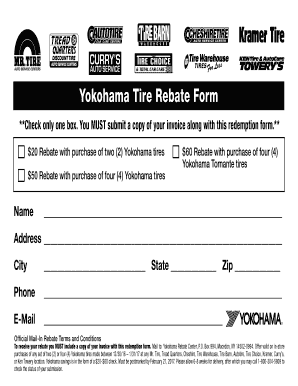
Get Yokohama Tire Rebate Form 2016-2026
How it works
-

Open form follow the instructions
-

Easily sign the form with your finger
-

Send filled & signed form or save
How to fill out the Yokohama Tire Rebate Form online
Filling out the Yokohama Tire Rebate Form online can be a straightforward process if you follow the right steps. This guide will provide clear instructions to help you complete the form accurately and efficiently.
Follow the steps to complete your rebate form online.
- Press the ‘Get Form’ button to download the Yokohama Tire Rebate Form and open it for editing.
- Begin by selecting the appropriate rebate offer by checking only one of the boxes for the rebate amount based on your purchase (either $20, $50, or $60).
- Fill in your name in the designated field to identify the rebate submission.
- Enter your complete address, including the street name, city, state, and zip code, to ensure proper handling of your rebate.
- Provide your phone number in the corresponding space, making it easier for the rebate center to contact you if needed.
- Insert your email address to receive updates regarding your rebate status.
- Ensure that you attach a copy of your invoice with the completed form to comply with the submission requirements.
- Once all sections are filled out, review the form for accuracy, and save your changes.
- You can then choose to download, print, or share the completed form as needed.
Complete your Yokohama Tire Rebate Form online today for potential savings!
Yokohama Tires generally provide good value for money as they offer competitive prices without compromising on quality or performance. They often come with extended warranties that contribute to peace of mind for consumers. On the other hand, Michelin tires tend to be priced at a premium level. Yokohama Tires vs Michelin: Comparing the Better Option medium.com https://medium.com › yokohama-tires-vs-michelin-comp... medium.com https://medium.com › yokohama-tires-vs-michelin-comp...