Head Office 40 Temperance Street, 16th Floor Toronto, ONM5H 0B4 Tel: 4163635621 or 18669770477 Fax: 4163634179 or 18003614768Client Relations Centre Toll Free: 18002688186 Tel: 5149083212 (English) Tel: 5149083217.
Loading

Open form follow the instructions

Easily sign the form with your finger

Send filled & signed form or save
How to fill out the Dynamic Funds RESP Withdrawal Form online
Completing the Dynamic Funds RESP Withdrawal Form is an essential step for users wishing to access their Registered Education Savings Plan (RESP) funds. This guide provides clear and supportive instructions to help you fill out the form accurately, ensuring a smooth withdrawal process.
Follow the steps to successfully complete the form.
- Press the ‘Get Form’ button to obtain the Dynamic Funds RESP Withdrawal Form and open it in your online editor.
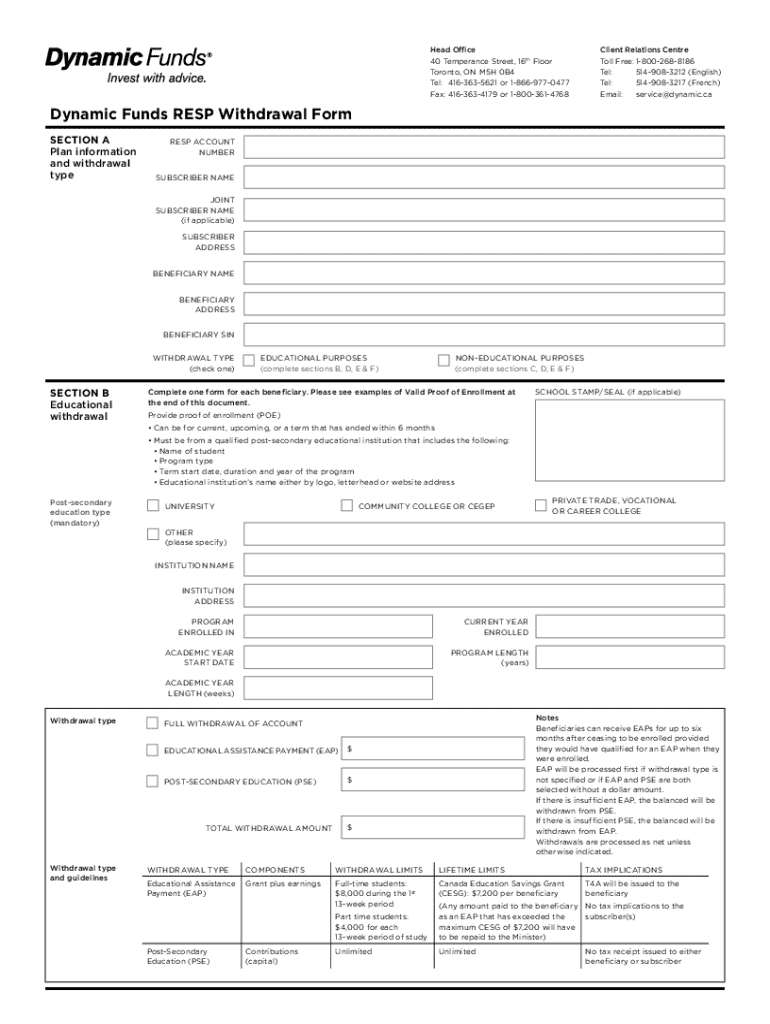
- In Section A, enter the RESP account number, subscriber name, joint subscriber name (if applicable), subscriber address, beneficiary name, beneficiary address, beneficiary social insurance number (SIN), and check the type of withdrawal you are requesting.
- If you are making an educational withdrawal, complete Section B by providing the proof of enrollment for the beneficiary. This includes details such as the post-secondary education type, institution name, enrollment status, and program details.
- If you are opting for a non-educational withdrawal, complete Section C by specifying the amount you wish to withdraw and acknowledging that some RESP grants may be repaid.
- In Section D, indicate which funds you would like to withdraw from by providing fund names, fund codes, and the percentage or dollar amount for each withdrawal.
- In Section E, clarify who the payment will be made payable to, and select your preferred method of payment, whether by electronic funds transfer or cheque. Be sure to include the appropriate mailing address for cheque delivery.
- Finally, in Section F, ensure that the subscriber, and if applicable, the joint subscriber, provide their signatures and dates to authorize the withdrawal.
- Once you have filled out all necessary sections, you can save your changes, download the form, print it, or share it as needed.
Start filling out your Dynamic Funds RESP Withdrawal Form online today for a hassle-free experience.
Experience a faster way to fill out and sign forms on the web. Access the most extensive library of templates available.
Related content
by A Capponi · Cited by 51 — In its application to the SEC for the approval of the...
Intent to Attend after Withdrawal form - Complete this form if (1) you are receiving...
by CE Sullivan · 1981 · Cited by 3996 — Through this process, relatively large funds...
Get answers to your most pressing questions about US Legal Forms API.
How do I RESP withdrawal?
You can withdraw unused contributions you made to an RRSP based on an approved Form T3012A, Tax Deduction Waiver on the Refund of Your Unused RRSP, PRPP, or SPP Contributions from your RRSP, PRPP or SPP. If you transferred the unused contributions to your RRIF, see Withdrawing the unused RRSP contributions.
What documents are required for RESP withdrawal?
To make an RESP withdrawal for educational purposes, the beneficiary must be enrolled in a qualifying institution and program. You'll need to submit confirmation of enrolment or an invoice as proof of enrolment to make a withdrawal for educational purposes.
How can I withdraw my RESP without paying tax?
Withdrawals made when the beneficiary has reached post-secondary education are non-taxable. That's because they are taken from the contribution amount portion of the RESP and taxes have already been paid on the funds the subscriber contributes directly.
Is Dynamic Funds owned by Scotiabank?
Dynamic Funds is a wholly owned subsidiary of Scotiabank, headquartered in Toronto.
What are dynamic funds?
A mutual fund scheme that adjusts its asset allocations (equity or debt) based on market conditions is known as a dynamic mutual fund. These funds employ an asset allocation strategy wherein they tweak the investments in securities depending on the conditions of the market.
Use professional pre-built templates to fill in and sign documents online faster. Get access to thousands of forms.
If you believe that this page should be taken down, please follow our DMCA take down process here.
This form is available in several versions. Select the version you need from the drop-down list below.