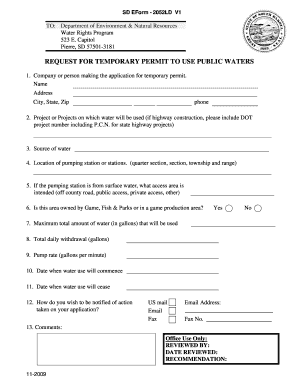
SD EForm - 2052LD V1 TO: Department of Environment & Natural Resources Water Rights Program 523 E. Capitol Pierre, SD 57501-3181 REQUEST FOR TEMPORARY PERMIT TO USE PUBLIC WATERS 1. Company or person.

How it works
  • Open form

    Open form follow the instructions

  • Easily sign form

    Easily sign the form with your finger

  • Share form

    Send filled & signed form or save

How to fill out the SD 2052LD V1 online

This guide aims to assist users in filling out the SD 2052LD V1 form, which is essential for requesting a temporary permit to use public waters. Carefully follow the step-by-step instructions to ensure accurate completion of the form online.

Follow the steps to complete the SD 2052LD V1 form online.

  1. Press the ‘Get Form’ button to access the SD 2052LD V1 and open it in your preferred online editor.
  2. In the first section, provide the name and address of the company or person applying for the temporary permit. Include details such as city, state, and zip code, followed by a contact phone number.
  3. Next, specify the project or projects where the water will be utilized. If applicable, include the DOT project number and P.C.N. for state highway projects.
  4. Identify the source of water you intend to use by selecting the appropriate option.
  5. Detail the location of the pumping station, specifying the quarter section, section, township, and range.
  6. If the water source is surface water, indicate the intended access area (e.g., off county road, public access, private access, or other options).
  7. Indicate whether the area is owned by the Game, Fish & Parks department or if it falls within a game production area.
  8. Enter the maximum total amount of water that will be used, specifying it in gallons.
  9. Provide the expected total daily withdrawal in gallons.
  10. Specify the pump rate, indicating how many gallons per minute will be pumped.
  11. Note the date when water use will begin.
  12. Indicate the date when water use is expected to cease.
  13. Select your preferred method of notification regarding the decision on your application—options include US mail, email, or fax.
  14. If you chose email or fax, be sure to provide the corresponding email address or fax number.
  15. Finally, include any comments or additional information you wish to provide.
  16. Once all information has been entered, you can save changes, download the form, print it, or share it as needed.

Complete your documents online today for a smoother submission process.

Get form

Experience a faster way to fill out and sign forms on the web. Access the most extensive library of templates available.

Related content

REQUEST FOR TEMPORARY PERMIT TO USE PUBLIC ...

Pierre, SD 57501-3181. REQUEST FOR TEMPORARY PERMIT TO USE PUBLIC WATERS. 1. Company or...

Learn more
Questions & Answers

Get answers to your most pressing questions about US Legal Forms API.

Contact support

Is withholding tax based on where you live or work?

Withholding tax in Ohio primarily depends on where you work. Employers generally withhold taxes based on the location of your job. However, if you live in a different municipality, you may have different obligations. Using the SD 2052LD V1 can help clarify how withholding taxes apply specifically to your situation.

If you owe school district income tax in Ohio, you are required to file an SD 100 form. This form captures your earnings and calculates the necessary tax owed to the school district. Ensure you file this form each year to maintain compliance. The SD 2052LD V1 can assist you in understanding whether you need to submit the SD 100.

Determining your exemption status from Ohio or school district income tax depends on several factors. Common exemptions include certain types of income, exemptions for retired individuals, or living in a district that does not impose such taxes. To clarify your personal situation, you can utilize the SD 2052LD V1, which offers guidance tailored to your income conditions.

In Ohio, school district taxes do not apply to Social Security benefits. These taxes target your income and specific earnings but exempt benefits intended to support retired individuals. Consequently, you should not fret about school district taxes affecting your Social Security. The SD 2052LD V1 can give you additional insights regarding your specific circumstances.

Ohio school district tax is based on where you reside. If you live in a district that imposes this tax, you become responsible for it regardless of where you work. Thus, it is crucial to consider your residential school district. Tools like the SD 2052LD V1 can assist you in understanding your tax responsibilities in detail.

In Ohio, local taxes are generally based on where you work. However, there are exceptions, particularly for those who live in a municipality with an income tax. It’s essential to understand your obligations, especially if you have multiple income sources. For comprehensive details, reviewing the SD 2052LD V1 can help you navigate these rules effectively.

In Ohio, students typically attend the school district where they reside. However, it's possible to apply for open enrollment in another district. This process allows residents to attend a different school district, but it requires approval from both the home district and the district you wish to attend. Utilizing resources like the SD 2052LD V1 can provide further clarity on open enrollment options.

Get This Form Now!

Use professional pre-built templates to fill in and sign documents online faster. Get access to thousands of forms.

If you believe that this page should be taken down, please follow our DMCA take down process here.

Get SD 2052LD V1