Loading
Get Pa Dscb 15-1507 2015
How it works
-

Open form follow the instructions
-

Easily sign the form with your finger
-

Send filled & signed form or save
How to fill out the PA DSCB 15-1507 online
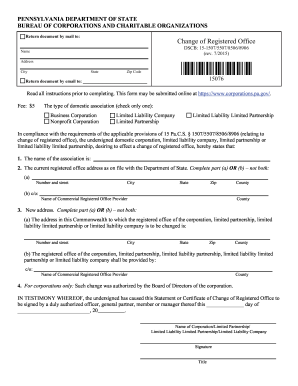
This guide provides step-by-step instructions for completing the Change of Registered Office form, PA DSCB 15-1507, online. Whether you are a business entity looking to update your registered office address or seeking clarification on the filing process, this comprehensive guide will assist you.
Follow the steps to successfully fill out the form.
- Click ‘Get Form’ button to access the form and open it in your preferred document editor.
- Enter the exact name of your association as it appears in the Department of State's records. This field is mandatory.
- Provide the current registered office address, which must match the address on file with the Department of State. Complete either part (a) or part (b) but not both: (a) enter your current number and street address, city, state, zip code, and county; or (b) if using a Commercial Registered Office Provider, complete the relevant fields.
- Fill in your new registered office address. Similar to the previous step, choose between part (a) or part (b): (a) specify the new registered office address details; or (b) if changing to a Commercial Registered Office Provider, provide the necessary information.
- If you are a corporation, indicate that the change was authorized by the Board of Directors or the appropriate governing body by checking the box and ensuring the statement is completed.
- Sign the document in the designated area to attest that all provided information is accurate. The signature must be from an authorized representative of your association.
- Review your form for completeness and accuracy. Once confident that every section is filled out correctly, you can either download, print, or share the form, as needed.
Complete your documents online today to ensure a smooth filing process.
Get form
Experience a faster way to fill out and sign forms on the web. Access the most extensive library of templates available.
You can easily lookup a registered business in Pennsylvania through the Secretary of State’s business entity search tool. The process follows the provisions stated in the PA DSCB 15-1507, allowing you to find comprehensive information about any registered entity. The search can reveal details on status, ownership, and more. For simplified access, consider using USLegalForms.
Get This Form Now!
Use professional pre-built templates to fill in and sign documents online faster. Get access to thousands of forms.