Loading
Get Ok Cg500 2011-2026
How it works
-

Open form follow the instructions
-

Easily sign the form with your finger
-

Send filled & signed form or save
How to fill out the OK CG500 online
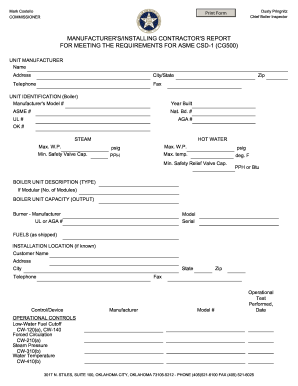
Filling out the OK CG500 form online is a crucial step for manufacturers and contractors to meet the requirements set by ASME CSD-1. This guide will provide clear and detailed instructions to help users efficiently complete the form.
Follow the steps to successfully complete the OK CG500 form.
- Click the ‘Get Form’ button to obtain the OK CG500 form and open it in your preferred online editor.
- In the 'Unit Manufacturer' section, fill in the name, address, city/state, telephone, fax, and zip code of the manufacturer.
- For 'Unit Identification (Boiler),' provide the manufacturer's model number, year built, ASME number, National Board number, UL number, AGA number, and OK number.
- Indicate the maximum working pressure (W.P.) and minimum safety valve capacity for both steam and hot water sections.
- In the 'Boiler Unit Description (Type)' section, specify if the unit is modular, and if so, indicate the number of modules.
- Enter the boiler unit capacity (output) including burner manufacturer, UL or AGA number, model, and serial number.
- Detail the fuels used as shipped and the installation location, including customer name, address, city, state, telephone, and zip code.
- Fill in the operational controls and safety controls sections, including relevant manufacturer and model numbers for devices.
- Document the operational test performed, including the date and details for safety or safety relief valves.
- Finally, the form requires signatures and dates from both the representing equipment manufacturer and installing contractor.
- Once all sections are completed, save your changes, and use the platform’s options to download, print, or share the completed form.
Complete your OK CG500 form online today for efficient processing.
To turn off your Casio CG50, press and hold the 'Shift' key and then tap the 'AC' button. This method is simple and ensures that your device powers down without any complications. It’s important to remember the shutdown process to safeguard your device from unnecessary battery drain. With the OK CG500, practicing these steps can enhance your overall experience.