Loading
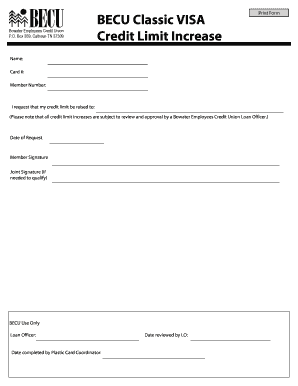
Get Tn Becu Classic Visa Credit Limit Increase 2010-2026
How it works
-

Open form follow the instructions
-

Easily sign the form with your finger
-

Send filled & signed form or save
How to fill out the TN BECU Classic VISA Credit Limit Increase online
This guide provides detailed instructions on how to complete the TN BECU Classic VISA Credit Limit Increase form online. Users can follow these steps to successfully request an increase in their credit limit with clear guidance.
Follow the steps to complete the online credit limit increase request.
- Press the ‘Get Form’ button to access the credit limit increase form and open it for editing.
- Fill in your full name in the Name field to ensure accurate identification and processing of your request.
- Enter your credit card number in the Card # field to specify which card this request applies to.
- Provide your member number in the Member Number field, which is essential for verifying your account as a member of BECU.
- Indicate the new credit limit you wish to be considered for in the 'I request that my credit limit be raised to:' section.
- Complete the Date of Request field to document when you are making this request.
- Sign the form in the Member Signature section. If applicable, include the Joint Signature of another member who qualifies for the request.
- For internal use, the Loan Officer and the Plastic Card Coordinator will complete their respective sections regarding the date of completion and review.
- After filling out all required fields, you can save your changes, download, print, or share the completed form as necessary.
Complete your credit limit increase request online today!
Call your card issuer at the number on the back of your card to request a credit limit increase. You'll need to provide your current income and possibly your monthly housing payment. Some card issuers also allow you to request a higher credit limit online.