Loading
Get Nh Llc-7 2013-2026
How it works
-

Open form follow the instructions
-

Easily sign the form with your finger
-

Send filled & signed form or save
How to fill out the NH LLC-7 online
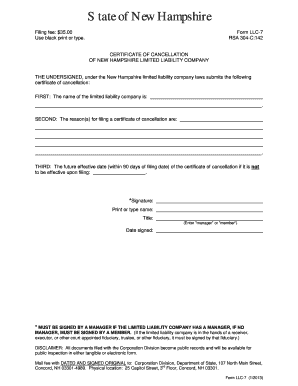
The NH LLC-7 is a crucial document for the cancellation of a limited liability company in New Hampshire. This guide provides clear, step-by-step instructions on how to accurately complete the form online.
Follow the steps to successfully complete the NH LLC-7 form online.
- Press the ‘Get Form’ button to access the NH LLC-7 form and open it in your browser.
- In the first section, input the exact name of the limited liability company as recorded in the official documents.
- In the second section, state the reason(s) for filing the certificate of cancellation. This could include reasons such as the company no longer conducting business or other relevant factors.
- In the third section, specify the future effective date of the cancellation, if you want it to be effective at a later date within 90 days of the filing date. If it should be effective upon filing, leave this section blank.
- Ensure that the form is signed by a manager if the limited liability company is managed by one; otherwise, it should be signed by a member. Include the printed name, title (manager or member), and the date signed.
- Once all sections are filled out correctly, you can save changes, download, print, or share the form as necessary.
Complete your NH LLC-7 form online today to facilitate the cancellation of your limited liability company.
The distinctions between LLC 3 and LLC 4 7 mainly lie in their filing requirements and operational structure in New Hampshire. LLC 3 often refers to a simplified reporting format, whereas LLC 4 7 pertains to more comprehensive regulations. Understanding these differences can help you choose the best type for your business needs and comply effectively with local regulations, especially when managing your NH LLC-7.