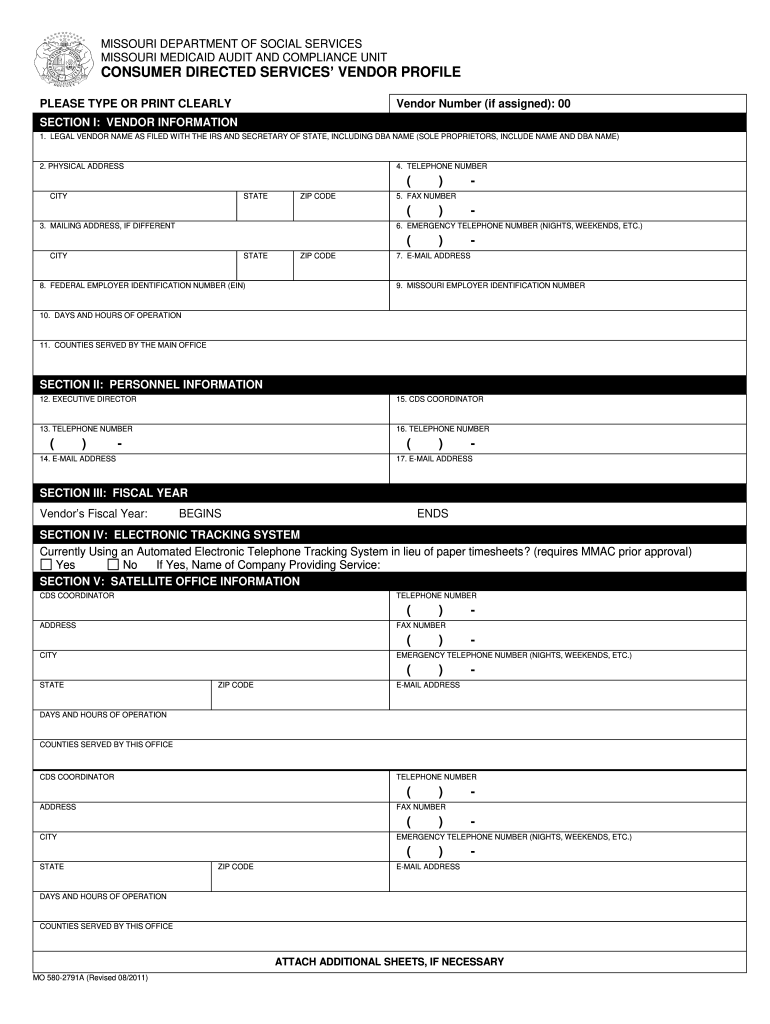
ION I: VENDOR INFORMATION 1. LEGAL VENDOR NAME AS FILED WITH THE IRS AND SECRETARY OF STATE, INCLUDING DBA NAME (SOLE PROPRIETORS, INCLUDE NAME AND DBA NAME) 2. PHYSICAL ADDRESS 4. TELEPHONE NUMBER ( CITY STATE ZIP CODE ( 3. MAILING ADDRESS, IF DIFFERENT ) - 5. FAX NUMBER ) - 6. EMERGENCY TELEPHONE NUMBER (NIGHTS, WEEKENDS, ETC.) ( CITY STATE 8. FEDERAL EMPLOYER IDENTIFICATION NUMBER (EIN) ZIP CODE ) - 7. E-MAIL ADDRESS 9. MISSOURI EMPLOYER IDENTIFICATION NUMBER 10. DAYS AND.

Open form follow the instructions

Easily sign the form with your finger

Send filled & signed form or save
How to fill out the MO MO 580-2791A online
Filling out the MO MO 580-2791A form is an essential step for vendors engaged in consumer-directed services in Missouri. This guide provides a clear and comprehensive overview of each section of the form, ensuring that all users, regardless of legal experience, can complete it accurately and efficiently.
Follow the steps to complete your form online.
- Click ‘Get Form’ button to obtain the form and open it in an appropriate editor.
- Begin with Section I: Vendor information. Enter your vendor number if assigned, or leave it blank if this is a proposal application.
- Input your legal vendor name as filed with the IRS and Missouri Secretary of State; include any DBA name.
- Fill in your physical address, ensuring all components (street, city, state, zip code) are accurate.
- Provide your primary telephone number, followed by the fax number for the main office.
- Enter an emergency telephone number for after-hours contact.
- Add your email address and the federal employer identification number (EIN) assigned by the IRS.
- Include your Missouri employer identification number (SEIN) and specify the days and hours of operation.
- List the counties served by your main office, excluding those covered by any satellite offices.
- Proceed to Section II: Personnel information. Enter the name of the executive director along with their telephone number and email address.
- Next, add the CDS coordinator's name, telephone number, and email address.
- Move to Section III: Fiscal Year. Indicate the month and day when your vendor’s fiscal year begins and ends.
- In Section IV: Electronic tracking system, indicate whether you are using an automated electronic tracking system. If yes, provide the name of the service provider.
- Complete Section V: Satellite office information if applicable. Enter details for any satellite offices and note any counties served by these offices.
- After reviewing the form for accuracy, save your changes, and you will then have options to download, print, or share the completed form.
Complete your MO MO 580-2791A form online today for a streamlined experience.
Experience a faster way to fill out and sign forms on the web. Access the most extensive library of templates available.
Related content
MO 580-2791A (Revised 08/2011). VENDOR PROFILE FORM INSTRUCTIONS. SECTION I: VENDOR...
ADS Classic is now deprecated. It will be completely retired in October 2019. This page...
modems, integral desktop PC mo- dems, laptop and notebook PCs, and pocket ... 2791A...
Get answers to your most pressing questions about US Legal Forms API.
Is a handwritten bill of sale legal in Missouri?
Yes, a handwritten bill of sale is legal in Missouri, but it should contain all necessary details to be valid. While the MO MO 580-2791A form simplifies the process, a handwritten version is acceptable if it includes the essential elements of the sale. Ensure both parties sign the document for further legitimacy. Using trusted resources like US Legal Forms can help you draft a proper format.
How to fill out a Missouri title when selling a car?
When selling a car in Missouri, you should complete the title by entering details on the back of the vehicle's title document. Make sure to include the buyer's name, address, and the date of sale. It is also essential to provide the odometer reading on the title. Using the MO MO 580-2791A form in conjunction with the title ensures all aspects of the sale are covered.
How to fill out a bill of sale in Missouri?
Filling out a bill of sale in Missouri involves obtaining the MO MO 580-2791A form, which can be easily found on platforms like US Legal Forms. You will need to enter details like the buyer and seller's information, the item being sold, and the sale amount. Completing this form accurately is crucial for legal purposes, so double-check all information before finalizing.
How do I amend a tax return that I already filed?
Amending a tax return you already filed requires completing the MO MO 580-2791A form with accurate updates. Start by identifying the sections that require changes, and make sure to provide correct information. Consulting the resources available on US Legal Forms can make this process less daunting.
How do I file my renters rebate in Missouri?
Filing your renters rebate in Missouri involves filling out the necessary application forms and submitting them to the state. Make sure to gather all required documents, as this will help you complete the process smoothly. Using US Legal Forms can guide you through the specifics and ensure you have everything needed for submission.
How do I file an amended state tax return in Missouri?
To file an amended state tax return in Missouri, complete the MO MO 580-2791A form with details of your amendments. Correct any errors from your original filing, and review the instructions carefully to ensure you meet all requirements. Tools provided by platforms like US Legal Forms can assist you throughout this process.
Can I file Missouri state taxes online?
Yes, you can file your Missouri state taxes online, which includes submitting forms like the MO MO 580-2791A. This online method is efficient, allowing you to file your return from the comfort of your home. Just ensure your software is updated to support electronic submissions.
How do I file an amended Missouri tax return?
Filing an amended Missouri tax return involves submitting the MO MO 580-2791A form. You will need to detail the changes and the reasons for amending your return. US Legal Forms offers step-by-step instructions that can help clarify this task if you feel uncertain.
How do I amend the filing status of my tax return?
To amend your filing status, you need to complete the appropriate section of the MO MO 580-2791A form. It's essential to review your original return and select the correct status that reflects your circumstances. Utilizing resources like US Legal Forms can simplify this process with comprehensive guidance.
Can you electronically file an amended tax return?
Yes, you can electronically file an amended tax return using specialized software that supports the submission of the MO MO 580-2791A form. This streamlined process saves time and helps you ensure that your amendments are processed efficiently. Make sure to follow the instructions carefully to avoid any mistakes.
Use professional pre-built templates to fill in and sign documents online faster. Get access to thousands of forms.
If you believe that this page should be taken down, please follow our DMCA take down process here.