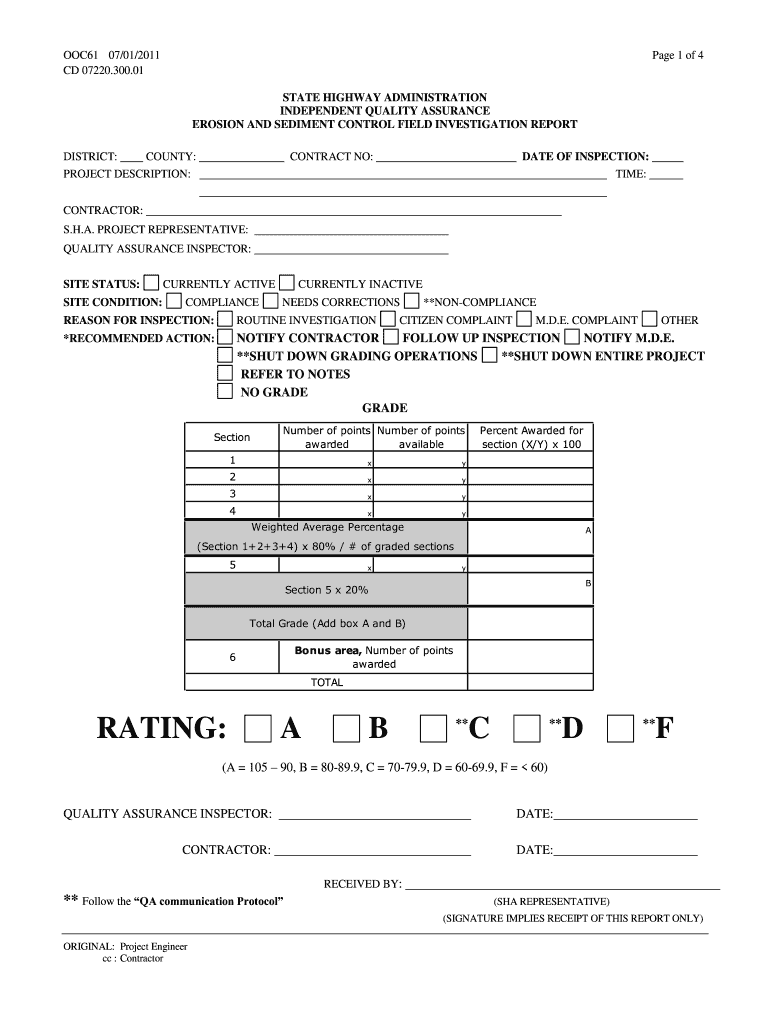
N: CONTRACT NO: DATE OF INSPECTION: TIME: CONTRACTOR: S.H.A. PROJECT REPRESENTATIVE: QUALITY ASSURANCE INSPECTOR: SITE STATUS: SITE CONDITION: CURRENTLY ACTIVE COMPLIANCE CURRENTLY INACTIVE NEEDS CORRECTIONS **NON-COMPLIANCE REASON FOR INSPECTION: ROUTINE INVESTIGATION CITIZEN COMPLAINT *RECOMMENDED ACTION: NOTIFY CONTRACTOR FOLLOW UP INSPECTION NOTIFY M.D.E. **SHUT DOWN GRADING OPERATIONS **SHUT DOWN ENTIRE PROJECT REFER TO NOTES NO GRADE GRADE Number of points Number of points award.

Open form follow the instructions

Easily sign the form with your finger

Send filled & signed form or save
How to fill out the MD OOC61 form online
Filling out the MD OOC61 online can be a straightforward process with the right guidance. This guide will provide you with step-by-step instructions to help you complete the form efficiently and accurately.
Follow the steps to successfully complete the MD OOC61 form.
- Press the ‘Get Form’ button to access the MD OOC61 form and open it in your editing interface.
- Begin by filling in the district and county information at the top of the form. This identifies the location of the project and helps with organization.
- Provide a brief description of the project under the 'Project Description' section. Be concise but informative.
- Enter the contract number related to your project. This helps link the inspection report to the appropriate contract.
- Fill in the date and time of inspection to document when the review took place.
- List the contractor's name and details of the SHA project representative overseeing the work.
- Document the quality assurance inspector's name. This is important for accountability.
- Indicate the site status by selecting one of the options: Currently active, Currently inactive, or Non-compliance. This provides a clear picture of the project's compliance status.
- Explain the reason for the inspection by selecting one of the options available.
- In the 'Recommended Action' section, specify the actions that need to be taken based on your findings.
- Complete the grading sections by assessing various components as per the questions. For each question, mark Y (yes) or N (no) and document any points awarded.
- Provide a summary of points awarded for each section, leading to a final rating based on the total scores.
- Once you have filled out all sections of the form, review your responses to ensure everything is accurate.
- Save your changes, download or print the form, or share it with relevant stakeholders as necessary.
Start completing your documents online today to streamline your workflow.
Experience a faster way to fill out and sign forms on the web. Access the most extensive library of templates available.
Related content
... MD 21076. It must be received by the Administration no later than three...
by SEG Hales · 1993 · Cited by 58 — ADS Classic is now deprecated. It will be...
Get answers to your most pressing questions about US Legal Forms API.
What are the unethical behaviors of nonprofits?
Unethical behaviors of nonprofits can include mismanagement of funds, lack of transparency in operations, and failing to deliver promised services. Some organizations may also engage in deceptive practices or prioritize personal interests over community needs. It is crucial for stakeholders to remain vigilant and report such behaviors. Utilizing MD OOC61 can provide clarity on what constitutes unethical conduct.
How to file a complaint against a nonprofit organization in Maryland?
To file a complaint against a nonprofit organization in Maryland, start by gathering all pertinent information about your concern. This includes details on the nonprofit's activities and any evidence you have. Next, submit your complaint to the Maryland Secretary of State or through the specific agency governing the organization. For assistance in navigating this process, consider the services offered through MD OOC61.
What is the complaint form for a non profit organization?
The complaint form for a nonprofit organization typically involves providing personal contact information and a clear description of the issue. Many states offer downloadable forms online, or you can contact the relevant state department for assistance. It's essential to include specific details to ensure your complaint is processed efficiently. Resources like MD OOC61 can direct you to the correct form based on your needs.
Who regulates nonprofit organizations in Maryland?
In Maryland, nonprofit organizations are primarily regulated by the Maryland Secretary of State's office, which oversees their registration and compliance. Additionally, the IRS monitors federal tax-exempt status, enforcing rules that nonprofits must follow. Regular audits and public reporting also contribute to holding these organizations accountable. Utilizing MD OOC61 can provide further information on regulatory requirements.
How to file a complaint against a mental health facility Maryland?
To file a complaint against a mental health facility in Maryland, you can contact the Maryland Department of Health. You will need to provide details about the issue, including dates, locations, and any supporting documentation. The process may vary based on the facility, so you should gather all relevant information before proceeding. For clarity and support, MD OOC61 can guide you through the complaint process effectively.
Who holds nonprofit organizations accountable?
Nonprofit organizations are held accountable by various government agencies and community stakeholders. State regulators ensure compliance with laws, while the IRS enforces federal tax regulations. Additionally, community members can play a vital role in holding nonprofits accountable through their participation and feedback. By utilizing MD OOC61 resources, individuals can gain insights into accountability mechanisms.
Use professional pre-built templates to fill in and sign documents online faster. Get access to thousands of forms.
If you believe that this page should be taken down, please follow our DMCA take down process here.