Loading
Form preview
  • US Legal Forms
  • Other Templates
  • Business Forms
  • Florida Business Forms
  • Fl Sub-contractor Confirmation - City Of Naples 2015

Get Fl Sub-contractor Confirmation - City Of Naples 2015-2026

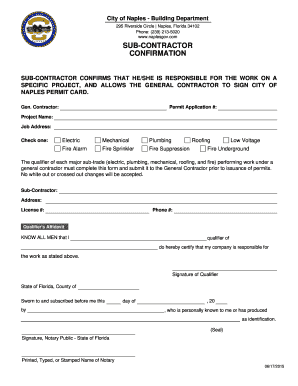
City of Naples Building Department 295 Riverside Circle Naples, Florida 34102 Phone: (239) 2135020 www.naplesgov.com SUBCONTRACTOR CONFIRMATION SUBCONTRACTOR CONFIRMS THAT HE/SHE IS RESPONSIBLE FOR.

How it works

  1. Open form

    Open form follow the instructions

  2. Easily sign form

    Easily sign the form with your finger

  3. Share form

    Send filled & signed form or save

How to fill out the FL Sub-Contractor Confirmation - City of Naples online

Filling out the FL Sub-Contractor Confirmation form is an important step for subcontractors working on specific projects in the City of Naples. This guide provides you with clear, step-by-step instructions to ensure your form is completed accurately and efficiently.

Follow the steps to complete the form accurately.

  1. Click ‘Get Form’ button to obtain the document and open it in an editable format.
  2. Begin by filling in the general contractor's name in the 'Gen. Contractor' field. Ensure that you use the full legal name as registered.
  3. Enter the permit application number in the designated field. This number correlates with the specific permit for your project.
  4. Provide the project name as it appears on your permit application. This helps in identifying the scope of your work.
  5. Input the job address where the work will be executed. Make sure the address is complete and accurate to avoid any processing delays.
  6. Select one of the options from the provided list of trades (electric, mechanical, plumbing, fire alarm, fire sprinkler, fire suppression, low voltage, roofing, fire underground) that corresponds to the type of work you will be performing.
  7. Fill out your business name in the 'Sub-Contractor' section, along with the address where your business is registered.
  8. Enter your license number in the specified field. This verifies your qualifications to perform the work indicated.
  9. Provide a contact phone number where you can be reached for any inquiries regarding your submission.
  10. In the 'Qualifier's Affidavit' section, write your name in the space provided to confirm your responsibility for the work being performed.
  11. Sign where indicated for your signature as the qualifier, certifying the accuracy of the information provided.
  12. Complete the notary section by selecting the county and providing the date of signing. A notary public will need to witness your signature.
  13. Finally, review the completed form for any errors or omissions. Once everything is correct, save your changes, then download, print, or share the form as needed.

Complete your FL Sub-Contractor Confirmation form online today to ensure timely project approval.

Get form

Experience a faster way to fill out and sign forms on the web. Access the most extensive library of templates available.
Get form

Related content

Servicios de resolución de permisos de...
City of Naples Permitting · City of Marco Island Permitting · Florida Department of...
Learn more
Building Inspections and Plan Review Consulting
May 30, 2017 — We are an established firm that has been providing Building Department...
Learn more
Encompass Health Corporation
Dec 31, 2020 — contractor, the Recovery Audit Contractors (“RACs”), receive...
Learn more

Related links form

Rivip Bidder Certification Cover Form Demit Form - Grand Commandery Of Knights Templar Of Pennsylvania Divorce Paperwork University Of New Brunswick Fredericton Campus

Questions & Answers

Get answers to your most pressing questions about US Legal Forms API.

Contact support

Changing a contractor in Florida involves notifying the local authority and providing relevant documentation about the new contractor. You may need to complete specific forms and possibly obtain additional approvals. To streamline this process, consider utilizing the resources available on the US Legal Forms platform, which can guide you in obtaining the FL Sub-Contractor Confirmation - City of Naples efficiently.

To change a contractor in accordance with the Florida building code, you must submit a contractor substitution form to the local building department. This form requires details about the new contractor, including their qualifications and experience. Ensuring that this process aligns with the requirements of the FL Sub-Contractor Confirmation - City of Naples is vital to maintain project integrity.

In Florida, a general contractor oversees various aspects of construction projects, including planning and management. On the other hand, a building contractor focuses specifically on constructing and remodeling structures. Understanding this distinction is crucial when seeking the FL Sub-Contractor Confirmation - City of Naples for your project.

The Florida Building Code undergoes updates every three years. These updates incorporate new safety measures, technologies, and practices to ensure the highest standards in construction. Staying informed about these changes is essential for compliance, especially for projects requiring the FL Sub-Contractor Confirmation - City of Naples.

General contractors typically find work through marketing, word-of-mouth referrals, and competitive bidding on projects. Building a strong online presence and maintaining positive relationships with clients can also attract new business. By securing FL Sub-Contractor Confirmation - City of Naples, contractors enhance their credibility and appeal to potential clients seeking reliable services.

General contractors usually find subcontractors by reaching out to their network, checking online reviews, and considering subcontractor directories. They may also use services focused on finding qualified subcontractors, streamlining the selection process. Utilizing resources like US Legal Forms can enhance this search, especially when dealing with FL Sub-Contractor Confirmation - City of Naples.

Avoid disclosing your maximum budget or revealing any personal stress about the project timeline. This information could limit your bargaining power and impact contractor relationships. Instead, focus on clear project requirements and a collaborative approach to achieve the best outcomes. For effective use of FL Sub-Contractor Confirmation - City of Naples, maintain open yet strategic communication.

General contractors often find subcontractors through networking, referrals, and online platforms. They also attend trade shows and industry events to connect with skilled professionals. By leveraging established relationships and utilizing services like US Legal Forms, contractors can access a wider pool of potential subcontractors for their projects. This is essential for FL Sub-Contractor Confirmation - City of Naples.

General contractors often mark up subcontractors by 10% to 30%, depending on the project and complexity. This markup covers costs such as management, overhead, and risk. Understanding the markup helps you budget better for your project and ensures transparency in the financial aspects of subcontracting. For FL Sub-Contractor Confirmation - City of Naples, knowing these details can inform your decisions.

To stop working with a contractor, you should consult your contract to understand the terms regarding termination. Next, provide written notice to the contractor explaining your reasons. For assistance, look into the FL Sub-Contractor Confirmation - City of Naples to ensure you handle the situation according to local requirements.

Get This Form Now!

Use professional pre-built templates to fill in and sign documents online faster. Get access to thousands of forms.
Get form
If you believe that this page should be taken down, please follow our DMCA take down processhere.
Get FL Sub-Contractor Confirmation - City of Naples
Get form
  • Adoption
  • Bankruptcy
  • Contractors
  • Divorce
  • Home Sales
  • Employment
  • Identity Theft
  • Incorporation
  • Landlord Tenant
  • Living Trust
  • Name Change
  • Personal Planning
  • Small Business
  • Wills & Estates
  • Packages A-Z
  • Affidavits
  • Bankruptcy
  • Bill of Sale
  • Corporate - LLC
  • Divorce
  • Employment
  • Identity Theft
  • Internet Technology
  • Landlord Tenant
  • Living Wills
  • Name Change
  • Power of Attorney
  • Real Estate
  • Small Estates
  • Wills
  • All Forms
  • Forms A-Z
  • Other Templates
  • Legal Hub
  • About Us
  • Help Portal
  • Legal Resources
  • Blog
  • Affiliates
  • Contact Us
  • Delete My Account
  • Site Map
  • Industries
  • Forms in Spanish
  • Localized Forms
  • State-specific Forms
  • Forms Kit
  • Real Estate Handbook
  • All Guides
  • Notarize
  • Incorporation services
  • For Consumers
  • For Small Business
  • For Attorneys
  • USLegal
  • FormsPass
  • pdfFiller
  • signNow
  • altaFlow
  • DocHub
  • Instapage
Form Packages
  • Adoption
  • Bankruptcy
  • Contractors
  • Divorce
  • Home Sales
  • Employment
  • Identity Theft
  • Incorporation
  • Landlord Tenant
  • Living Trust
  • Name Change
  • Personal Planning
  • Small Business
  • Wills & Estates
  • Packages A-Z
Form Categories
  • Affidavits
  • Bankruptcy
  • Bill of Sale
  • Corporate - LLC
  • Divorce
  • Employment
  • Identity Theft
  • Internet Technology
  • Landlord Tenant
  • Living Wills
  • Name Change
  • Power of Attorney
  • Real Estate
  • Small Estates
  • Wills
  • All Forms
  • Forms A-Z
  • Other Templates
Customer Service
  • Legal Hub
  • About Us
  • Help Portal
  • Legal Resources
  • Blog
  • Affiliates
  • Contact Us
  • Delete My Account
  • Site Map
  • Industries
  • Forms in Spanish
  • Localized Forms
  • State-specific Forms
  • Forms Kit
Legal Guides
  • Real Estate Handbook
  • All Guides
Prepared for you
  • Notarize
  • Incorporation services
Our Customers
  • For Consumers
  • For Small Business
  • For Attorneys
Our Sites
  • USLegal
  • FormsPass
  • pdfFiller
  • signNow
  • altaFlow
  • DocHub
  • Instapage
Social Media
Call us now toll free:
+1 833 426 79 33
As seen in:
© Copyright 1999-2026 airSlate Legal Forms, Inc. 17 Station Street, Ste. 203, Brookline, MA 02445
  • Your Privacy Choices
  • Terms of Service
  • Privacy Notice
  • Content Takedown Policy
  • Bug Bounty Program