Loading
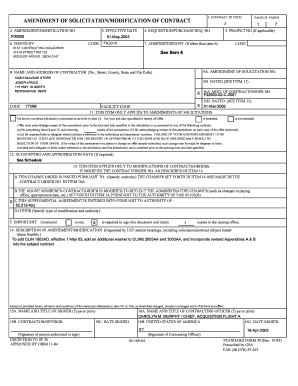
Get P00008 - Keesler Air Force Base
How it works
-

Open form follow the instructions
-

Easily sign the form with your finger
-

Send filled & signed form or save
How to fill out the P00008 - Keesler Air Force Base online
Filling out the P00008 form for Keesler Air Force Base can be a straightforward process when following the correct steps. This guide provides clear and concise instructions to help users navigate each section of the form effectively.
Follow the steps to complete the P00008 form online.
- Press the ‘Get Form’ button to obtain the P00008 document and open it in your preferred editor.
- In Section 1, enter the Contract ID Code as provided in the contract details. This uniquely identifies your document.
- Fill in Amendment/Modification Number in Section 2 to track changes associated with the specific contract.
- Specify the effective date of the amendment in Section 3. Ensure you use the correct date format, which is typically MM-DD-YYYY.
- For Section 4, list the Requisition/Purchase Request Number to align your form with internal procurement processes.
- If applicable, complete Section 5 with the project number related to the contract under review.
- In Section 6, include the name of the entity issuing the form along with their contact details as required.
- Section 7 should reflect who administers the contract, indicating any department or individual responsible.
- Sections 8 and 9 require you to add the name and address of the contractor along with the solicitation number.
- Section 10 should detail the contract/order number, including the date it was issued.
- For Section 12, include any necessary accounting or appropriation data as dictated by the project requirements.
- In Section 14, provide a detailed description of the amendment or modification, ensuring clarity and accuracy regarding contract changes.
- Finalize the document by including names, titles, and signatures in the concluding sections (15A-16C) to validate the contract modifications.
- Review all entries and then save your changes. Depending on your need, you can download, print, or share the completed form.
Complete your documents online today to ensure timely processing!
Mission. The major command at Keesler is the Air Education and Training Command. The 81st TRW's mission is to Train, Develop, and Inspire Warfighters. The 81st Training Group is responsible for nearly 500 training courses both locally and at detachments and satellite locations.
Industry-leading security and compliance
US Legal Forms protects your data by complying with industry-specific security standards.
-
In businnes since 199725+ years providing professional legal documents.
-
Accredited businessGuarantees that a business meets BBB accreditation standards in the US and Canada.
-
Secured by BraintreeValidated Level 1 PCI DSS compliant payment gateway that accepts most major credit and debit card brands from across the globe.