Loading
Get Tmo3hospform.doc
How it works
-

Open form follow the instructions
-

Easily sign the form with your finger
-

Send filled & signed form or save
How to fill out the TMO3Hospform.doc online
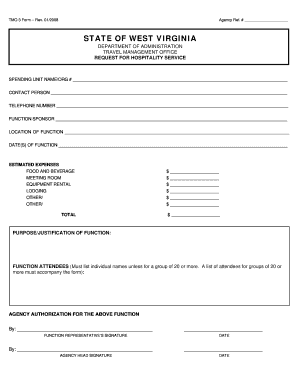
Filling out the TMO3Hospform.doc is a straightforward process that enables effective management of hospitality services. This guide provides step-by-step instructions to assist users in completing the form online with ease.
Follow the steps to complete the form accurately.
- Click the ‘Get Form’ button to access the form electronically and open it for editing.
- Enter your agency reference number in the designated field labeled 'Agency Ref. #'. This number helps identify your submission.
- Provide the name of your spending unit or organization in the field marked 'Spending Unit Name/Org #'. Ensure clarity for proper identification.
- Input the contact person's name in the 'Contact Person' field. This is the individual responsible for the submission.
- Fill out the 'Telephone Number' section with a contact number for the person listed above.
- Specify the function sponsor in the 'Function Sponsor' field. This identifies who is sponsoring the hospitality function.
- Indicate the location of the function next. This should be where the hospitality event will take place.
- Enter the date(s) of the function in the allotted field, ensuring accuracy for planning purposes.
- Estimate expenses by filling out each relevant section such as 'Food and Beverage', 'Meeting Room', 'Equipment Rental', 'Lodging', and 'Other'. Write the amounts alongside the appropriate categories.
- Calculate the total estimated expenses and write it in the 'Total' field to summarize the financial aspects of the function.
- Describe the purpose or justification of the function in the designated section. This provides context for the expenses incurred.
- List the attendees of the function, making sure to provide individual names unless it is for a group of 20 or more. For larger groups, a separate list must accompany the form.
- Complete the authorization section by having the function representative sign and date the form, followed by the agency head's signature.
- After filling out all sections, review the form for accuracy. You can then save changes, download, print, or share the completed form as needed.
Complete the TMO3Hospform.doc online today to manage your hospitality services efficiently.
Industry-leading security and compliance
US Legal Forms protects your data by complying with industry-specific security standards.
-
In businnes since 199725+ years providing professional legal documents.
-
Accredited businessGuarantees that a business meets BBB accreditation standards in the US and Canada.
-
Secured by BraintreeValidated Level 1 PCI DSS compliant payment gateway that accepts most major credit and debit card brands from across the globe.