Loading
Get Fl 40c-1.181 2013-2026
How it works
-

Open form follow the instructions
-

Easily sign the form with your finger
-

Send filled & signed form or save
How to fill out the FL 40C-1.181 online
Filling out the FL 40C-1.181 form online is a straightforward process that ensures your submission meets all necessary requirements. This guide will provide you with clear, step-by-step instructions to help you complete your form accurately and efficiently.
Follow the steps to complete the FL 40C-1.181 online effortlessly.
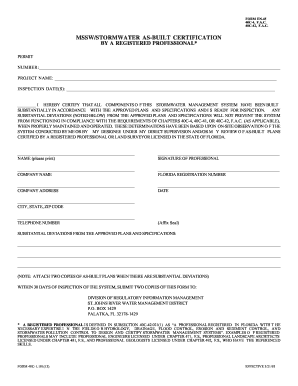
- Press the ‘Get Form’ button to access the FL 40C-1.181 form and open it in your preferred editor.
- Enter the permit number in the designated space provided at the top of the form.
- Fill in the project name accurately to identify the respective project for which you are certifying the stormwater management system.
- Document the inspection date(s) related to the system you are certifying.
- In the certification statement, ensure you clearly state that all components of the stormwater management system have been built in accordance with approved plans.
- If there are any substantial deviations from the approved plans, note them in the space provided as ‘SUBSTANTIAL DEVIATIONS FROM THE APPROVED PLANS AND SPECIFICATIONS.’
- Include your printed name, signature, and company details in the respective fields.
- Provide your Florida registration number and the company address.
- Indicate the date of signing and enter the city, state, and ZIP code where your company is located.
- Ensure your telephone number is included for any follow-up communications.
- Attach two copies of the as-built plans if you noted any substantial deviations, as required.
- After completing the form, review all entries for accuracy, then save changes, download, print, or share the form as needed.
Complete your forms online today to ensure a smooth submission process.