Loading
Get Uk R40 2023-2026
How it works
-

Open form follow the instructions
-

Easily sign the form with your finger
-

Send filled & signed form or save
How to fill out the UK R40 online
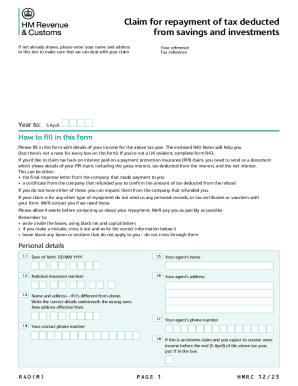
The UK R40 form is designed for individuals seeking repayment of tax deducted from their savings and investments. This guide provides comprehensive and user-friendly steps for accurately completing the R40 online.
Follow the steps to properly complete your R40 form.
- Press the ‘Get Form’ button to access the form and open it in your chosen interface.
- Begin by entering your personal details, including your name and address in the designated section. This ensures that your claim is processed effectively.
- Complete the 'Year to:' field with the relevant tax year ending on 5 April and provide your tax reference in the appropriate box.
- Carefully fill in your date of birth and National Insurance number. Make sure these are accurate as they are crucial for identification.
- If applicable, provide details about your agent, including their name and address. This step is only necessary if you have someone managing your claim.
- In the income section, report all relevant UK employment income, pensions, state benefits, and any deductions made. Make sure to enter the total amounts before any tax is taken off, as instructed.
- Proceed to the UK interest and dividends section. Here, indicate net interest received from various sources, including any stock dividends, using accurate figures post-tax.
- Continue by filling out the trust, settlement, and estate income section, including tax figures where applicable.
- Next, enter details about foreign income and any other related benefits, ensuring to convert amounts to sterling if necessary.
- Complete the Gift Aid and Blind Person’s Allowance sections only if they apply to you. Input necessary figures and check boxes as appropriate.
- For married couple’s allowance, follow the instructions carefully, providing your spouse or partner's details where needed.
- In the repayment instructions section, indicate if you are nominating a professional to act on your behalf, and provide any required agent reference number.
- Finally, sign and date the form in the declaration section, ensuring that you have included your name and title in capital letters.
- After completing the form, save changes to your document. You can then download, print, or share your completed R40 form as necessary.
Submit your R40 online to claim your tax repayment efficiently.
Related links form
You can download form R40 from GOV.UK. If you are unable to print the form off yourself (or with help from friends/a local library, etc.) then you will have to phone HMRC to request that they send you a copy. The phone number to use is: 0300 200 3300.