Loading
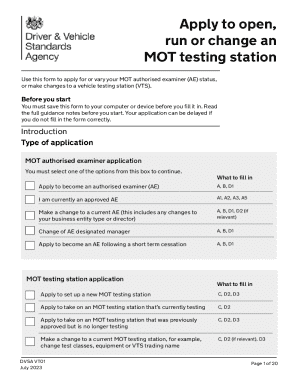
Get Uk Vt01 2023-2026
How it works
-

Open form follow the instructions
-

Easily sign the form with your finger
-

Send filled & signed form or save
How to fill out the UK VT01 online
Filling out the UK VT01 form is essential for applying to open, run, or change an MOT testing station. This guide will provide you with clear, step-by-step instructions to help you complete the process efficiently and accurately.
Follow the steps to fill out the UK VT01 form online.
- Click ‘Get Form’ button to obtain the form and open it in the editor.
- Begin by selecting the type of application you are submitting from the provided options in the application box. This decision is crucial as it determines the rest of your application process.
- In Part A, declare that the information you provide is true and accurate. This is required to be signed by the appropriate individual based on your business structure.
- Fill in your current Authorised Examiner (AE) number if applicable, along with your reason for applying or changing your AE status.
- Provide your business details, including the business structure (sole trader, partnership, or limited company), registered office address, contact numbers, and email addresses.
- In Part A5, declare if your business has any unspent criminal convictions. If there are any, further forms will be required.
- Nominate an Authorised Examiner Designated Manager (AEDM) and provide necessary details regarding their qualifications and responsibilities in the MOT testing service.
- In Part B, include the details for the Authorised Examiner Principal (AEP) which requires personal information and declarations.
- Complete Part C which focuses on the specific details of the MOT testing station, including its address, test classes, and any connected equipment.
- Conclude by filling out Part D, which involves submitting supporting documents, such as partnership agreements, DBS checks, and site plans as required.
- After completing all sections of the form, ensure to save your changes before submitting. You can also download, print, or share your completed application.
Complete your UK VT01 form online today for a smooth application process.