Loading

Open form follow the instructions

Easily sign the form with your finger

Send filled & signed form or save
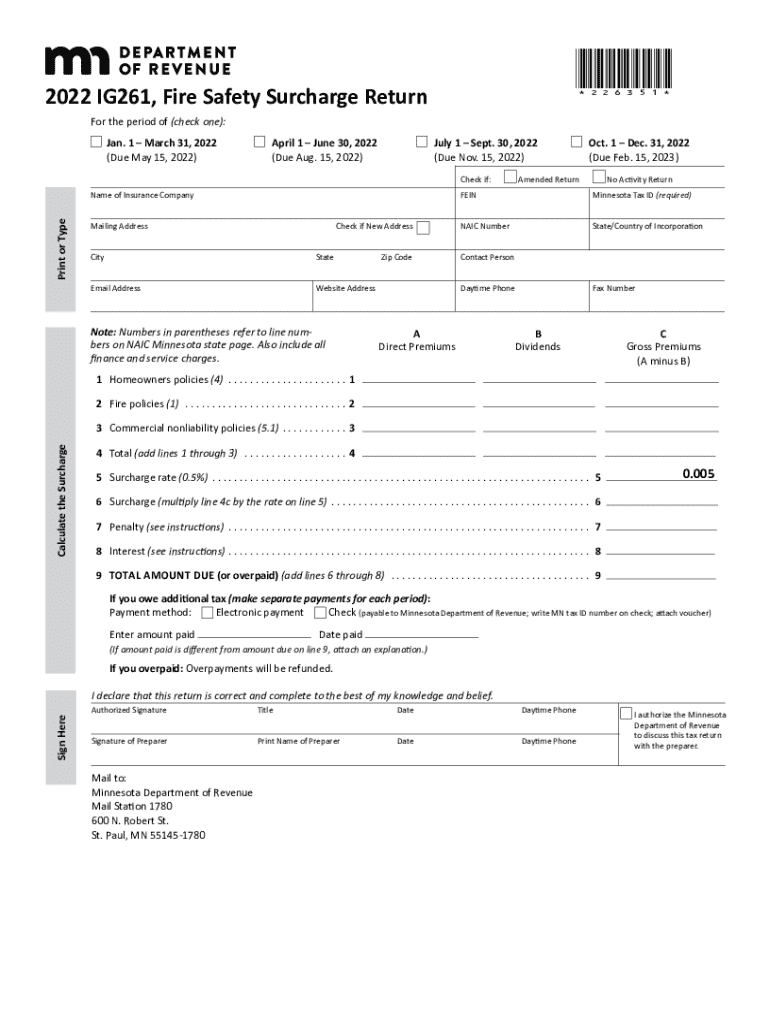
How to fill out the MN IG261 online
The MN IG261 form is essential for insurers in Minnesota to report fire safety surcharges. This guide provides a clear, step-by-step approach to help users complete the form online efficiently and correctly.
Follow the steps to complete the MN IG261 form online
- Click the ‘Get Form’ button to access the MN IG261 form and open it in your preferred PDF editor.
- Begin by entering your organization’s name, FEIN, and Minnesota Tax ID at the top of the form. Ensure that all information is current.
- Indicate whether the return is an amended return or a no activity return by checking the relevant boxes at the top of the form.
- Fill in the gross premiums for homeowners policies in line 1, as outlined in the instructions. Include any finance or service charges.
- Next, complete line 2 with all fire premiums written, again including any applicable charges.
- On line 3, enter all commercial non-liability premiums written. This should align with the supplemented information from the state page.
- After completing lines 1 through 3, calculate the total by adding these lines together and enter the sum on line 4.
- Determine the surcharge rate as specified on line 5 (0.5%) and calculate the surcharge by multiplying the total from line 4c by the surcharge rate on line 5 to enter on line 6.
- Refer to the instructions to assess if any penalties apply for late payments, entering the calculated amount on line 7.
- Calculate any interest due as stated in the instructions and record this amount on line 8.
- Add the totals from lines 6 through 8 to determine the total amount due or overpaid, entering this figure on line 9.
- Indicate your payment method in the respective section, choosing either electronic payment or check, and provide the amount paid and date.
- Complete the remaining personal and business information, including contact details and authorized signature.
- Finally, save your changes, download a copy of the filled form, and ensure it is mailed to the Minnesota Department of Revenue at the specified address.
Complete your documents online to ensure efficient filing and compliance.
Experience a faster way to fill out and sign forms on the web. Access the most extensive library of templates available.
Related content
297I.06 SURCHARGES ON FIRE SAFETY PREMIUMS. ; Subdivision 1.Insurance policies surcharge...
screw and nut, F'ig. 261.1. In § 2 we have already noticed the characteristics of ... MN...
Get answers to your most pressing questions about US Legal Forms API.
What is form M1 in Minnesota?
Before starting your Minnesota income tax return (Form M1, Individual Income Tax), you must complete federal Form 1040 to determine your federal taxable income. We use scanning equipment to process paper returns.
What is a 1040-ES estimated tax form?
Use Form 1040-ES to figure and pay your estimated tax. Estimated tax is the method used to pay tax on income that is not subject to withholding (for example, earnings from self-employment, interest, dividends, rents, alimony, etc.).
What is the Minnesota estimated tax form?
Use federal Form 1040-ES, Estimated Tax for Individuals, to calculate your federal adjusted gross income. Use Form M1, Individual Income Tax, to estimate your Minnesota tax liability and credits for the year.
Does MN have a state income tax form?
Minnesota State Income Tax Forms If you need Minnesota income tax forms: Download forms from the Minnesota Department of Revenue. Photocopy the forms you need at a library. Call 800-657-3676 or 651-296-4444 to place an order.
What is the Minnesota state estimated tax form?
Use Form M1, Minnesota Individual In- come Tax, to estimate your Minnesota tax liability and credits for the year. You can get the form and instructions from our website. Go to .revenue.state.mn.us. Type M1 into the Search box. Individual Estimated Income Tax Payment Instructions revenue.state.mn.us https://.revenue.state.mn.us › sites › files › est_inst_15 revenue.state.mn.us https://.revenue.state.mn.us › sites › files › est_inst_15
What is MN fire safety surcharge?
to 0.65% Due to a law change, the Fire Safety Surcharge on homeowners', commercial fire, and commercial non-liability insurance policies will increase from 0.5% to 0.65%. The new rate applies to policies issued or renewed July 1, 2023, and later. Fire Safety Surcharge | Minnesota Department of Revenue Minnesota Department of Revenue https://.revenue.state.mn.us › fire-safety-surcharge Minnesota Department of Revenue https://.revenue.state.mn.us › fire-safety-surcharge
Use professional pre-built templates to fill in and sign documents online faster. Get access to thousands of forms.
If you believe that this page should be taken down, please follow our DMCA take down process here.
This form is available in several versions. Select the version you need from the drop-down list below.