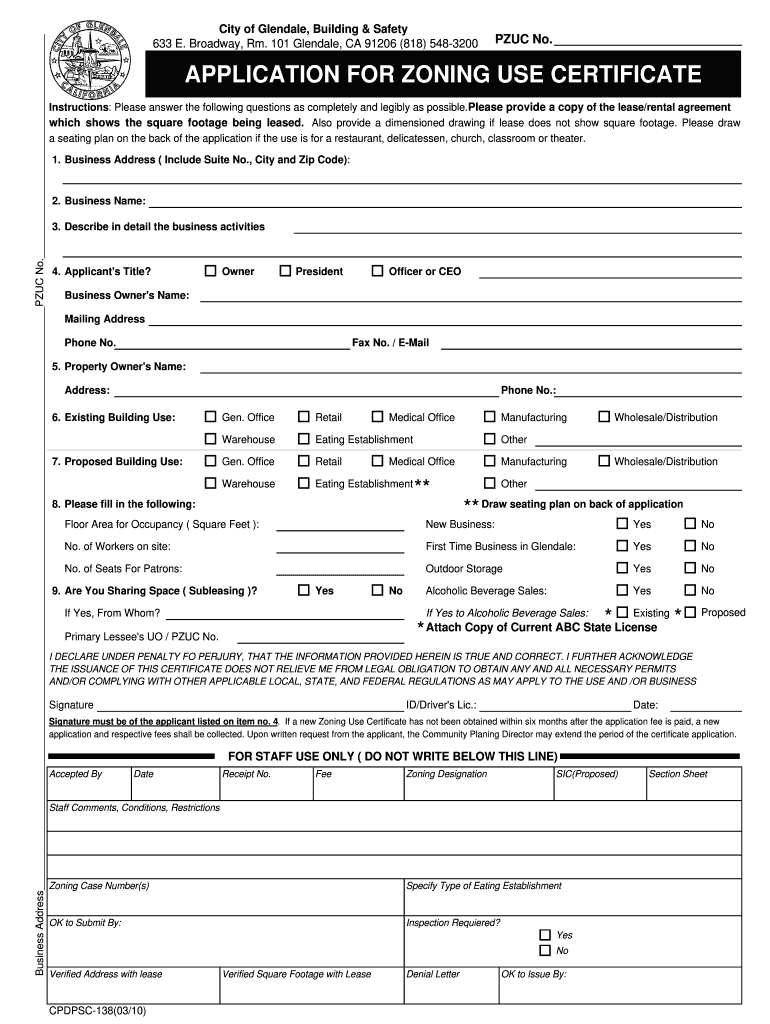
Business AddressPZUC No. City of Glendale Building Safety 633 E. Broadway Rm. 101 Glendale CA 91206 818 548-3200 PZUC No. APPLICATION FOR ZONING USE CERTIFICATE Instructions Please answer the following questions as completely and legibly as possible. Please provide a copy of the lease/rental agreement which shows the square footage being leased* Also provide a dimensioned drawing if lease does not show square footage. Please draw a seating plan on the back of the application if the use is for a restaurant delicatessen church classroom or theater. 2. Business Name 3. Describe in detail the business activities 4. Applicant s Title Owner President Officer or CEO Business Owner s Name Mailing Address Phone No* Fax No* / E-Mail 5. Property Owner s Name Address 6. Existing Building Use 7. Proposed Building Use Gen* Office Warehouse Retail Medical Office Eating Establishment Manufacturing Other Wholesale/Distribution Draw seating plan on back of application 8. Please fill in the following F....
Loading

Open form follow the instructions

Easily sign the form with your finger

Send filled & signed form or save
How to fill out the CA CPDPSC-138 online
The CA CPDPSC-138 form is essential for obtaining a zoning use certificate in Glendale, California. This comprehensive guide will walk you through the online process of completing this form accurately and efficiently.
Follow the steps to successfully fill out the CA CPDPSC-138 form.
- Click the ‘Get Form’ button to obtain the CA CPDPSC-138 form and launch it in your editing tool.
- Begin by entering the business address, including the suite number, city, and zip code. Ensure that all information is accurate and complete.
- Provide the legal business name in the designated field.
- In the following section, describe in detail the activities that your business will undertake.
- Select your title from the options provided, such as owner, president, or officer/CEO. Then, enter your name, mailing address, phone number, and email address.
- Input the property owner's name, address, and phone number in the respective fields.
- Indicate the existing and proposed building use by checking the appropriate boxes. If the business is a restaurant or similar, ensure to draw your seating plan on the back of the application.
- Complete the floor area for occupancy (in square feet) and answer questions related to your business model, including the number of workers, whether this is a first-time business in Glendale, the number of seats for patrons, and if outdoor storage is required.
- Indicate whether you are sharing your space by selecting 'yes' or 'no.' If you plan to sell alcoholic beverages, answer accordingly and attach a copy of the current ABC state license if applicable.
- Review the declaration section carefully, signing and dating it to confirm the truthfulness of your provided information.
- Lastly, ensure to save your changes, download, print, or share the completed form for submission.
Complete your CA CPDPSC-138 form online today to ensure a smooth application process.
Experience a faster way to fill out and sign forms on the web. Access the most extensive library of templates available.
Related content
This paper presents a comprehensive reference table of Pali literature, cataloging various...
Get answers to your most pressing questions about US Legal Forms API.
Who qualifies for the $350 payment in California?
The $350 payment in California is directed towards specific groups who face financial challenges, including those affected by recent inflation. Eligibility is determined based on income and residency parameters. By examining the guidelines tied to CA CPDPSC-138, you can find out if you fall into the qualifying category.
What is California Penal Code 138?
California Penal Code 138 outlines legislation related to financial regulations and public funds in California. This code plays a crucial role in addressing state fiscal policy. Understanding the implications of CA CPDPSC-138 can be beneficial in navigating related legal processes.
Who gets the $1200 California stimulus check?
The $1200 California stimulus check is typically given to eligible individuals and households that meet income thresholds. Those who qualify under certain criteria will benefit from this financial support. When referencing CA CPDPSC-138, it's essential to check if you fulfill the conditions for this stimulus check.
How much is the inflation relief check?
The amount for the inflation relief check varies depending on individual income and marital status. Generally, the checks can range from a few hundred dollars to more substantial aid. Understanding the calculations behind CA CPDPSC-138 can help you determine the exact amount you may receive.
Who qualifies for the California inflation relief checks?
Eligibility for the California inflation relief checks generally includes residents who meet specific income guidelines. Additionally, one must be a resident of California to receive benefits. If you are uncertain about your qualification under CA CPDPSC-138, reviewing the criteria can provide clarity.
What is the California Inflation Relief Check?
The California Inflation Relief Check provides financial assistance to residents affected by rising living costs. It's designed to help individuals manage essential expenses. Primarily associated with CA CPDPSC-138, this program aims to ease the burden of inflation on Californians.
Where can I get physical copies of tax forms?
You can access physical copies of tax forms at local IRS offices, state government buildings, and some public libraries. While forms like CA CPDPSC-138 may not always be available at your nearest location, many local offices carry a variety of essential tax documents. For quick access, consider using USLegalForms, which allows you to print the necessary forms from the comfort of your home.
How do I get a California certificate?
To obtain a California certificate, you must initially determine which type you need, as there are several forms and requirements. Generally, this process may involve completing the necessary applications, including forms like CA CPDPSC-138. You can find detailed instructions and forms on the California government's official site or through USLegalForms, which provides a comprehensive solution for obtaining your certificate.
Where can I get California state tax forms near me?
To find California state tax forms nearby, check with local government offices, public libraries, and community centers. Many of these locations stock essential forms, including CA CPDPSC-138. Alternatively, you can directly download forms from the state website or utilize USLegalForms for a broader selection of tax documents. This ensures you get everything you need without leaving home.
How to fill out California resale certificate?
Filling out a California resale certificate involves entering the seller's name, address, and seller's permit number at the top. Next, include the buyer's information, including name and address, and detail the specific items being purchased for resale. This form allows you to buy goods without paying sales tax, making it essential for businesses engaged in reselling.
Use professional pre-built templates to fill in and sign documents online faster. Get access to thousands of forms.
If you believe that this page should be taken down, please follow our DMCA take down process here.