Loading
Get Cbp 5106 2023-2026
How it works
-

Open form follow the instructions
-

Easily sign the form with your finger
-

Send filled & signed form or save
How to fill out the CBP 5106 online
Filling out the CBP 5106 form online is an essential step for importers and consignees to provide accurate information to U.S. Customs and Border Protection. This guide will help you navigate each section of the form with clear and supportive instructions aimed at ensuring accurate completion.
Follow the steps to effectively complete the CBP 5106 online.
- Press the ‘Get Form’ button to obtain the form and open it in your editor.
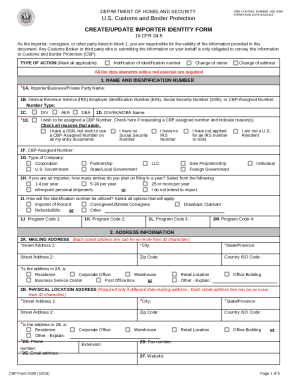
- Begin with the first section titled 'Name and identification number'. In '1A', enter the importer or business name. In '1B', provide your IRS Employer Identification Number or Social Security Number, indicating the type of number selected.
- Fill out '1C' with any additional names associated with your business, such as 'doing business as' (DBA) names.
- For '1E', check the box if you wish to be assigned a CBP Number, and indicate the applicable reasons for your request.
- Complete '1G' by indicating the type of company, selecting from the options provided, such as corporation, partnership, or sole proprietorship.
- In '1H', specify how many entries you plan to file in a year, selecting from the given options.
- For '2A', enter your mailing address. Ensure that all fields marked with an asterisk (*) are filled in, including street address, city, state, and zip code.
- If your physical location address differs from your mailing address, complete section '2B' with the necessary details.
- In section '3, company information', provide details such as a business description, NAICS code, and the D-U-N-S Number.
- Finally, ensure all sections are complete and review your entries for accuracy. Once satisfied, you can save changes, download, print, or share the completed form as needed.
Begin filling out your CBP 5106 form online today to ensure compliance and smooth processing.
The Create/Update Importer Identity Form (CBP Form 5106) is the form used to create or update importers' unique identification information within CBP's systems, per 19 CFR 24.5.