Loading
Get Nc Surface Water Identification (swid) Request - Orange County 2022-2026
How it works
-

Open form follow the instructions
-

Easily sign the form with your finger
-

Send filled & signed form or save
How to fill out the NC Surface Water Identification (SWID) Request - Orange County online
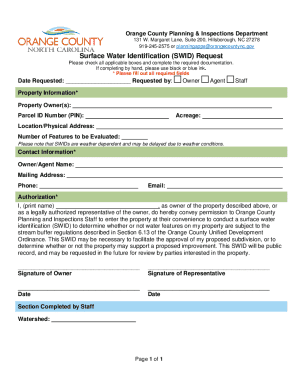
This guide provides detailed instructions for completing the NC Surface Water Identification (SWID) Request for Orange County. Whether you are a property owner or an authorized representative, these steps will help ensure that your submission is clear and complete.
Follow the steps to complete the SWID request online.
- Use the ‘Get Form’ button to access the necessary document and open it in your preferred online editor.
- Fill in the 'Date Requested' field with the current date. Indicate whether you are the owner, agent, or staff by checking the corresponding box.
- Input the property owner's name(s) in the 'Property Owner(s)' section. Provide the Parcel ID Number (PIN), acreage, and the physical address of the property in the designated fields.
- Specify the number of features that will be evaluated on the property, noting that the SWID process can be affected by weather conditions.
- Complete your contact information by entering the name, mailing address, phone number, and email of the owner or agent.
- In the 'Authorization' section, print the name of the property owner or authorized representative and indicate the authority to allow planning staff to access the property for the surface water identification.
- Obtain signatures from both the property owner and the authorized representative, along with the corresponding dates.
- The final step is to review all entries for accuracy. Once completed, you can save changes, download the form, print it out, or share it as necessary.
Start filling out your NC Surface Water Identification (SWID) Request online today!