We use cookies to improve security, personalize the user experience, enhance our marketing activities (including cooperating with our marketing partners) and for other business use.
Click "here" to read our Cookie Policy. By clicking "Accept" you agree to the use of cookies. Read less
Read more
Accept
Loading
Form preview
  • US Legal Forms
  • Form Library
  • More Forms
  • More Uncategorized Forms
  • Ca Fictitious Business Name Statement - County Of San Joaquin 2024

Get Ca Fictitious Business Name Statement - County Of San Joaquin 2024-2025

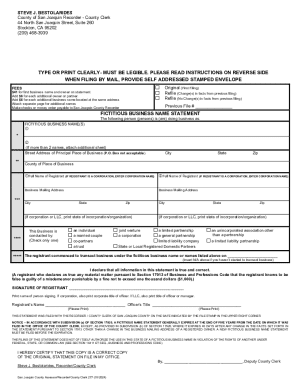
STEVE J. BESTOLARIDES County of San Joaquin Recorder County Clerk 44 North San Joaquin Street, Suite 260 Stockton, CA 95202 (209) 4683939TYPE OR PRINT CLEARLY MUST BE LEGIBLE. PLEASE READ INSTRUCTIONS.

How it works

  1. Open form

    Open form follow the instructions

  2. Easily sign form

    Easily sign the form with your finger

  3. Share form

    Send filled & signed form or save

How to fill out the CA Fictitious Business Name Statement - County Of San Joaquin online

This guide provides clear instructions for completing the CA Fictitious Business Name Statement for San Joaquin County online. You will find a step-by-step approach to help you navigate the form, ensuring all necessary information is provided accurately and efficiently.

Follow the steps to complete your Fictitious Business Name Statement online.

  1. Press the ‘Get Form’ button to access the CA Fictitious Business Name Statement. This will enable you to open the form in your online editor.
  2. Begin filling out the form by indicating whether this is an original filing, a refile with changes, or a refile without changes. Check the appropriate box provided on the form.
  3. List the fictitious business name or names you are using. You can include up to two names directly on the form. If you have more than two, prepare to attach a separate sheet.
  4. Enter the street address of your principal place of business. Note that a P.O. Box is not acceptable as a business address. Make sure this address is complete, including the city, state, and zip code.
  5. Provide your full name as the registrant. If you are filing as a corporation, enter the corporation’s name instead.
  6. Fill in your business mailing address, including city, state, and zip code. If you are a corporation or LLC, include the state of incorporation.
  7. Indicate the nature of your business by selecting one option from the list provided (individual, married couple, co-partners, etc.). Only check one box.
  8. Insert the date you commenced business under the fictitious name. If you have not started yet, you can enter N/A.
  9. Sign the form to declare that all information is true and correct. Include your printed name and, if applicable, corporate title.
  10. Once all sections are completed, review your entries for accuracy and clarity. You can then save changes, download, print, or share the completed form as needed.

Complete and submit your Fictitious Business Name Statement online today for a smooth filing process.

Get form

Experience a faster way to fill out and sign forms on the web. Access the most extensive library of templates available.
Get form

Related content

garnishment / attachment deduction codes - State...
Jun 22, 2020 — OSPS.99.33, Garnishment Code Request Form, found on our website at this...
Learn more
[PDF] Vendor Contracts - University of California...
VELLUTINI CORP DBA ROYAL ELECTRIC CO. 0001525633. $ ... DE LAGE LADEN PUBLIC FINANCE LLC...
Learn more
Early Irish law - Wikipedia
Redwood Castle, County Tipperary, although built by the Normans, was later occupied by the...
Learn more

Related links form

Sentence Completion 1 Level 10 Answers Screening For Distress Form - Alberta Health Services Englishforeveryone Org Name Date Sentence Completion 2 (highintermediate Level) Directions: Choose The Best Word(s) To

Questions & Answers

Get answers to your most pressing questions about US Legal Forms API.

Contact support

An individual or a business entity must file a fictitious business name (FBN) statement with the Registrar-Recorder/County Clerk's office in the county where the business will be located when the name of the business does not include the owner's last name.

A Fictitious Business Name Statement expires five years from the date it is filed with the County Clerk. A renewal of a fictitious business name statement must be filed prior to the date of expiration if you intend to continue doing business under that name and if there are no changes from the original.

To receive a copy of a Fictitious Business Name Statement over the phone, please contact (800) 201-8999, and provide: FBN Statement information.

What is a Fictitious Business Name (FBN) Statement? The purpose of registering a Fictitious Business Name (FBN) with the County Clerk Recorder is to ensure that consumers have access to the true name and address of the owners of a business (Business and Professions Code Section § 17920).

California DBA Search You first do a DBA name lookup to make sure that the name is available. You can search for the name on the name search page of the Los Angeles County Registrar-Recorder/County Clerk website. Be sure to follow California naming requirements for a California DBA search.

Setting Up a DBA in California Start with the county where you intend to do business. For example, if you're operating in Los Angeles, California, you'll want to visit the LA County website. The fee here is $26. You can opt to complete the process online or download the forms and mail them in later on.

Along with the California DBA form, you'll need to pay registration fees to complete the process. You can submit these in person, through the mail, or online when you register a DBA in California.

An individual or a business entity must file a fictitious business name (FBN) statement with the Registrar-Recorder/County Clerk's office in the county where the business will be located when the name of the business does not include the owner's last name.

Get This Form Now!

Use professional pre-built templates to fill in and sign documents online faster. Get access to thousands of forms.
Get form
If you believe that this page should be taken down, please follow our DMCA take down processhere.

Industry-leading security and compliance

US Legal Forms protects your data by complying with industry-specific security standards.
  • In businnes since 1997
    25+ years providing professional legal documents.
  • Accredited business
    Guarantees that a business meets BBB accreditation standards in the US and Canada.
  • Secured by Braintree
    Validated Level 1 PCI DSS compliant payment gateway that accepts most major credit and debit card brands from across the globe.
Get CA Fictitious Business Name Statement - County Of San Joaquin
Get form
Form Packages
Adoption
Bankruptcy
Contractors
Divorce
Home Sales
Employment
Identity Theft
Incorporation
Landlord Tenant
Living Trust
Name Change
Personal Planning
Small Business
Wills & Estates
Packages A-Z
Form Categories
Affidavits
Bankruptcy
Bill of Sale
Corporate - LLC
Divorce
Employment
Identity Theft
Internet Technology
Landlord Tenant
Living Wills
Name Change
Power of Attorney
Real Estate
Small Estates
Wills
All Forms
Forms A-Z
Form Library
Customer Service
Terms of Service
Privacy Notice
Legal Hub
Content Takedown Policy
Bug Bounty Program
About Us
Help Portal
Legal Resources
Blog
Affiliates
Contact Us
Delete My Account
Site Map
Industries
Forms in Spanish
Localized Forms
State-specific Forms
Forms Kit
Legal Guides
Real Estate Handbook
All Guides
Prepared for You
Notarize
Incorporation services
Our Customers
For Consumers
For Small Business
For Attorneys
Our Sites
US Legal Forms
USLegal
FormsPass
pdfFiller
signNow
airSlate WorkFlow
DocHub
Instapage
Social Media
Call us now toll free:
+1 833 426 79 33
As seen in:
  • USA Today logo picture
  • CBC News logo picture
  • LA Times logo picture
  • The Washington Post logo picture
  • AP logo picture
  • Forbes logo picture
© Copyright 1997-2025
airSlate Legal Forms, Inc.
3720 Flowood Dr, Flowood, Mississippi 39232
Form Packages
Adoption
Bankruptcy
Contractors
Divorce
Home Sales
Employment
Identity Theft
Incorporation
Landlord Tenant
Living Trust
Name Change
Personal Planning
Small Business
Wills & Estates
Packages A-Z
Form Categories
Affidavits
Bankruptcy
Bill of Sale
Corporate - LLC
Divorce
Employment
Identity Theft
Internet Technology
Landlord Tenant
Living Wills
Name Change
Power of Attorney
Real Estate
Small Estates
Wills
All Forms
Forms A-Z
Form Library
Customer Service
Terms of Service
Privacy Notice
Legal Hub
Content Takedown Policy
Bug Bounty Program
About Us
Help Portal
Legal Resources
Blog
Affiliates
Contact Us
Delete My Account
Site Map
Industries
Forms in Spanish
Localized Forms
State-specific Forms
Forms Kit
Legal Guides
Real Estate Handbook
All Guides
Prepared for You
Notarize
Incorporation services
Our Customers
For Consumers
For Small Business
For Attorneys
Our Sites
US Legal Forms
USLegal
FormsPass
pdfFiller
signNow
airSlate WorkFlow
DocHub
Instapage
Social Media
Call us now toll free:
+1 833 426 79 33
As seen in:
  • USA Today logo picture
  • CBC News logo picture
  • LA Times logo picture
  • The Washington Post logo picture
  • AP logo picture
  • Forbes logo picture
© Copyright 1997-2025
airSlate Legal Forms, Inc.
3720 Flowood Dr, Flowood, Mississippi 39232