Loading
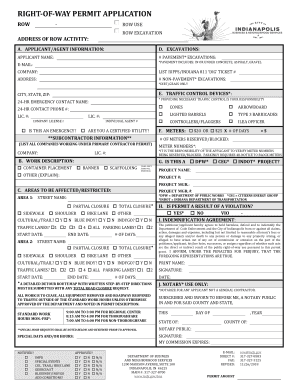
Get Right-of-way Permit Application - Aws
How it works
-

Open form follow the instructions
-

Easily sign the form with your finger
-

Send filled & signed form or save
How to fill out the Right-of-way Permit Application - AWS online
Filling out the Right-of-way Permit Application - AWS online is an essential step for obtaining permission for activities within public right-of-way areas. This guide provides comprehensive, step-by-step instructions to help users understand and complete the application accurately.
Follow the steps to complete your Right-of-way Permit Application successfully.
- Click ‘Get Form’ button to obtain the form and open it in the online editor.
- Enter the address where the right-of-way activity will take place in the designated field. Ensure it is accurate and complete to avoid processing delays.
- Provide your contact information as the applicant or agent. Fill in your name, company, email address, and relevant contact details.
- Specify the type of excavation you are planning, selecting between pavement or non-pavement excavation as required.
- Indicate the traffic control devices you will provide, such as cones, barricades, or flaggers, by checking the respective boxes.
- Describe the work in detail within the work description section. Clearly state the nature of the project and any specific equipment or materials being used.
- Identify the areas to be affected by the project by providing street names and selecting whether the impact is a partial or total closure.
- If the permit is due to a violation, indicate 'Yes' or 'No.' Confirm if it is an emergency situation that requires immediate attention.
- Review and digitally sign the indemnification agreement, affirming your commitment to hold harmless the associated city departments from any claims.
- Finalize the application by providing your name, signature, and the date. Ensure all required fields are completed before submitting.
- Once the application is complete, save your changes, and consider downloading a copy or sharing it as needed for your records.
Start completing your Right-of-way Permit Application online today to ensure smooth processing.