Loading
Get Za Unisa Dsar05 2013-2026
How it works
-

Open form follow the instructions
-

Easily sign the form with your finger
-

Send filled & signed form or save
How to fill out the ZA UNISA DSAR05 online
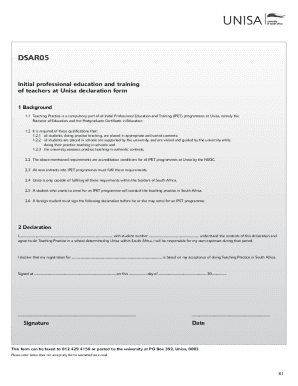
The ZA UNISA DSAR05 form is essential for students enrolling in Initial Professional Education and Training programmes at Unisa. This guide provides step-by-step instructions to ensure users can easily complete the form accurately and effectively.
Follow the steps to successfully complete the ZA UNISA DSAR05 form.
- Click the ‘Get Form’ button to access the form and open it in the online editor.
- Begin by entering your full name in the designated field, ensuring that it matches the name on your official documents.
- Input your student number correctly to help the university identify your records.
- Read the declaration statement carefully, as it outlines your understanding and agreement to conduct teaching practice within South Africa. It is crucial to understand your responsibilities during this period.
- In the section regarding your programme, specify the name of the qualification you are registering for. This includes either the Bachelor of Education or the Postgraduate Certificate in Education.
- Sign the declaration in the appropriate section to confirm your commitment to fulfilling the requirements of the teaching practice.
- Enter the date of signing the declaration to ensure your submission is complete.
- After completing all necessary fields, save your changes. You can then download, print, or share the completed form as needed.
Ensure your success by completing the ZA UNISA DSAR05 form online today.
A declaration is a statement which associates a data type and identifier to a variable. In many programming languages, it is necessary to precede the assignment of a value to a variable with a declaration statement, which would prepare (or initialize) the variable to be ready to receive data.