Loading
Form preview
  • US Legal Forms
  • Form Library
  • More Forms
  • More Uncategorized Forms
  • Au Form 24 2018

Get Au Form 24 2018-2026

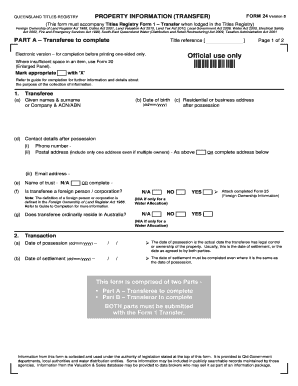
And Register Act 1988, Duties Act 2001, Land Valuation Act 2010, Land Tax Act 2010, Local Government Act 2009, Water Act 2000, Electrical Safety Act 2002, Fire and Emergency Services Act 1990, South-East Queensland Water (Distribution and Retail Restructuring) Act 2009, Taxation Administration Act 2001 PART A A - Transferee to complete PART Title reference Electronic version for completion before printing one-sided only. Page 1 of 2 Official use only Where insufficient space in.

How it works

  1. Open form

    Open form follow the instructions

  2. Easily sign form

    Easily sign the form with your finger

  3. Share form

    Send filled & signed form or save

How to fill out the AU Form 24 online

Filling out the AU Form 24 is an essential step in property transactions within Queensland. This guide provides clear, step-by-step instructions on how to accurately complete the form online to ensure compliance with relevant legislation.

Follow the steps to complete the AU Form 24 online.

  1. Click the ‘Get Form’ button to access the AU Form 24 and open it in the editor.
  2. In Part A, the transferee needs to fill out their personal details, including their names, date of birth, and contact information. Ensure to refer to the instructions for additional guidance.
  3. Specify whether the transferee is a foreign person or corporation and indicate if they ordinarily reside in Australia. This is important for compliance with the Foreign Ownership of Land Register Act 1988.
  4. Next, provide details about the transaction, including the dates of possession and settlement. Make sure these dates are accurate as they affect the legal aspects of the property transfer.
  5. Proceed to Part B, where the transferor must complete their residential or business address after settlement and the sale price details, including cash and any assumptions of liabilities.
  6. Fill in the property details, including descriptions, addresses, and current land use, ensuring all sections are completed to meet registration requirements.
  7. Answer any additional questions related to the transaction, such as agreements for transfer and GST applicability.
  8. Once all applicable sections are filled out, review the information for accuracy. Users can then save changes, download the file, print it, or share it as needed.

Start completing your AU Form 24 online today to ensure your property transaction is processed smoothly.

Get form

Experience a faster way to fill out and sign forms on the web. Access the most extensive library of templates available.
Get form

Related content

appendix i - SEC.gov
For example, a Form 24F-2 for a fiscal year ending on June 30 must be filed no later than...
Learn more
Direct Deposit Enrollment (24-0296) - Veterans...
IMPORTANT: You can use this form to enroll in Direct Deposit or to make a change to an...
Learn more
Social Security number - Wikipedia
In the United States, a Social Security number (SSN) is a nine-digit number issued to U.S...
Learn more

Related links form

Thel California DBO Fair Lending Disclosure. DBO Fair Lending Agreement Warranty Of Completion Of Construction Immediate Recoupment Request Form - WPS Wps Medicare Fax Cover Sheet For Appeals Indiana

Questions & Answers

Get answers to your most pressing questions about US Legal Forms API.

Contact support

How long does registration take? Most correctly prepared dealings are registered within our service time of 3–5 working days. You can use the dealing number on your lodgement summary to check the status of your lodgement using our online dealing status search enquiry.

Form 1—Permit work application for plumbingm drainage and on-site sewerage work.

Form 25—restoration of licence | Queensland Building and Construction Commission.

The information on the Form 24 is required for the Office of State Revenue and to monitor compliance with legislative requirements relating to electrical safety switches (Electrical Safety Office) and smoke alarms (Queensland Fire and Emergency Services); and to update information held on the valuation and sales ...

When a property is sold, the vendor must also lodge a Form 24 (transfer of title form) with Titles Queensland (formerly named the Queensland Land Registry Office), stating that the above requirements of the smoke alarm legislation have been met, and that the purchaser is aware of the fact.

Transferring freehold land Title details. The current details of the property (including the property description, title reference and ownership information) are required to complete the form. ... Transfer duty. ... Consideration. ... Deposit of supporting evidence. ... Certification requirements for supporting evidence. ... Privacy statement.

Get This Form Now!

Use professional pre-built templates to fill in and sign documents online faster. Get access to thousands of forms.
Get form
If you believe that this page should be taken down, please follow our DMCA take down processhere.

Industry-leading security and compliance

US Legal Forms protects your data by complying with industry-specific security standards.
  • In businnes since 1997
    25+ years providing professional legal documents.
  • Accredited business
    Guarantees that a business meets BBB accreditation standards in the US and Canada.
  • Secured by Braintree
    Validated Level 1 PCI DSS compliant payment gateway that accepts most major credit and debit card brands from across the globe.
Get AU Form 24
Get form
  • Adoption
  • Bankruptcy
  • Contractors
  • Divorce
  • Home Sales
  • Employment
  • Identity Theft
  • Incorporation
  • Landlord Tenant
  • Living Trust
  • Name Change
  • Personal Planning
  • Small Business
  • Wills & Estates
  • Packages A-Z
  • Affidavits
  • Bankruptcy
  • Bill of Sale
  • Corporate - LLC
  • Divorce
  • Employment
  • Identity Theft
  • Internet Technology
  • Landlord Tenant
  • Living Wills
  • Name Change
  • Power of Attorney
  • Real Estate
  • Small Estates
  • Wills
  • All Forms
  • Forms A-Z
  • Form Library
  • Legal Hub
  • About Us
  • Help Portal
  • Legal Resources
  • Blog
  • Affiliates
  • Contact Us
  • Delete My Account
  • Site Map
  • Industries
  • Forms in Spanish
  • Localized Forms
  • State-specific Forms
  • Forms Kit
  • Real Estate Handbook
  • All Guides
  • Notarize
  • Incorporation services
  • For Consumers
  • For Small Business
  • For Attorneys
  • USLegal
  • FormsPass
  • pdfFiller
  • signNow
  • altaFlow
  • DocHub
  • Instapage
Form Packages
  • Adoption
  • Bankruptcy
  • Contractors
  • Divorce
  • Home Sales
  • Employment
  • Identity Theft
  • Incorporation
  • Landlord Tenant
  • Living Trust
  • Name Change
  • Personal Planning
  • Small Business
  • Wills & Estates
  • Packages A-Z
Form Categories
  • Affidavits
  • Bankruptcy
  • Bill of Sale
  • Corporate - LLC
  • Divorce
  • Employment
  • Identity Theft
  • Internet Technology
  • Landlord Tenant
  • Living Wills
  • Name Change
  • Power of Attorney
  • Real Estate
  • Small Estates
  • Wills
  • All Forms
  • Forms A-Z
  • Form Library
Customer Service
  • Legal Hub
  • About Us
  • Help Portal
  • Legal Resources
  • Blog
  • Affiliates
  • Contact Us
  • Delete My Account
  • Site Map
  • Industries
  • Forms in Spanish
  • Localized Forms
  • State-specific Forms
  • Forms Kit
Legal Guides
  • Real Estate Handbook
  • All Guides
Prepared for you
  • Notarize
  • Incorporation services
Our Customers
  • For Consumers
  • For Small Business
  • For Attorneys
Our Sites
  • USLegal
  • FormsPass
  • pdfFiller
  • signNow
  • altaFlow
  • DocHub
  • Instapage
Social Media
Call us now toll free:
+1 833 426 79 33
As seen in:
© Copyright 1999-2026 airSlate Legal Forms, Inc. 3720 Flowood Dr, Flowood, Mississippi 39232
  • Your Privacy Choices
  • Terms of Service
  • Privacy Notice
  • Content Takedown Policy
  • Bug Bounty Program