Loading
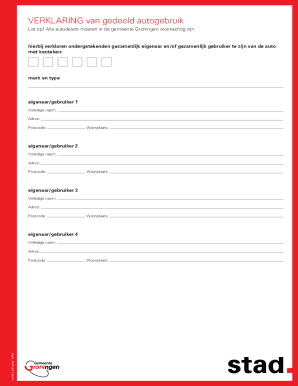
Get Nl Gemeente Groningen Verklaring Van Gedeeld Autogebruik 2016-2026
How it works
-

Open form follow the instructions
-

Easily sign the form with your finger
-

Send filled & signed form or save
How to fill out the NL Gemeente Groningen Verklaring Van Gedeeld Autogebruik online
Navigating the process of filling out the Verklaring Van Gedeeld Autogebruik can seem daunting. This guide provides clear and concise instructions to help you complete the form efficiently and accurately.
Follow the steps to successfully complete your form.
- Press the ‘Get Form’ button to access the form and open it in your preferred application.
- In the first section, enter the vehicle registration number (kenteken) of the shared car. This is essential for identifying the vehicle you are referring to.
- Next, fill out the details for the first owner/user. Provide the full name, address, postal code, and city of residence.
- Repeat the previous step for each additional owner/user (up to a total of four). Ensure that each participant's information is accurate and complete.
- After completing all required fields, review the information to ensure accuracy. It's crucial that all details are correct before submitting.
- Once you are satisfied with the information entered, you can proceed to save your changes, download the form for personal records, print a physical copy, or share the completed form with any required parties.
Complete your Verklaring Van Gedeeld Autogebruik online today for a smooth shared vehicle experience.
De scanauto maakt scans van kentekens en controleert in een database of u een parkeervergunning of ander parkeerrecht hebt. Daarnaast kijkt de scanauto of de auto fout is geparkeerd. Dit is wanneer u uw auto op een plek buiten de parkeervakken parkeert of stil laat staan.