Loading
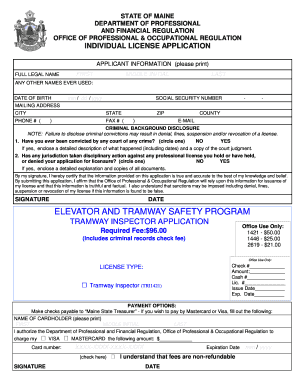
Get Board Of Elevator And Tramway Safety - Maine.gov - Maine
How it works
-

Open form follow the instructions
-

Easily sign the form with your finger
-

Send filled & signed form or save
How to fill out the BOARD OF ELEVATOR AND TRAMWAY SAFETY - Maine.gov - Maine online
This guide is designed to help users effectively complete the Board of Elevator and Tramway Safety application online. It provides a clear and supportive walkthrough of each section to ensure that all information is submitted accurately and completely.
Follow the steps to fill out the application correctly.
- Press the ‘Get Form’ button to access the application. This will allow you to obtain the form for the Board of Elevator and Tramway Safety.
- Begin by providing your full legal name. Include your first name, middle initial, and last name in the designated fields.
- List any other names you have ever used, if applicable. This information may assist in the verification process.
- Enter your date of birth in the format mm/dd/yyyy. This helps confirm your identity.
- Input your social security number. This is a mandatory field used for tax administration purposes.
- Provide your mailing address, including city, state, ZIP code, and county to ensure correspondence reaches you.
- Fill in your contact information, including phone number and email address, to allow for effective communication regarding your application.
- Complete the criminal background disclosure section. Indicate whether you have ever been convicted of a crime and provide details if necessary.
- If you have had disciplinary actions against any professional licenses, disclose this information and include any relevant documents.
- Affirm the accuracy of your information by signing and dating the application at the designated area.
- Select the type of license you are applying for from the options provided.
- Note the required fee for the application and provide payment information if applicable. Ensure payment is directed to the Maine State Treasurer.
- Provide employment history, including the names and addresses of current and previous employers, along with employment dates and job titles.
- Review your application carefully to ensure all sections are completed and that you have provided necessary documents.
- Finally, save any changes made to your application, print a copy for your records, and submit the application as instructed.
Get started on your application today and ensure all documents are filled out accurately to facilitate a smooth review process.
Industry-leading security and compliance
US Legal Forms protects your data by complying with industry-specific security standards.
-
In businnes since 199725+ years providing professional legal documents.
-
Accredited businessGuarantees that a business meets BBB accreditation standards in the US and Canada.
-
Secured by BraintreeValidated Level 1 PCI DSS compliant payment gateway that accepts most major credit and debit card brands from across the globe.