Loading
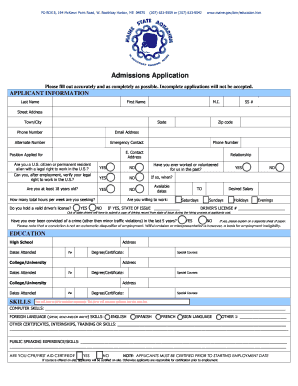
Get Receptionist Application, Pdf File, 1.4 Mb - Maine.gov - Maine
How it works
-

Open form follow the instructions
-

Easily sign the form with your finger
-

Send filled & signed form or save
How to fill out the Receptionist Application, Pdf File, 1.4 MB - Maine.gov - Maine online
Filling out the Receptionist Application is an essential step toward securing a position at the Maine State Aquarium. This guide will provide you with clear and detailed instructions to ensure you accurately complete every section of the application form.
Follow the steps to successfully complete your application.
- Click the ‘Get Form’ button to access the application form. This will allow you to open the document and begin filling it out.
- Start by entering your personal information in the 'Applicant Information' section. Fill in your last name, first name, and middle initial, if applicable. Include your street address, town or city, state, zip code, phone number, and email address, ensuring each field is filled out completely.
- Indicate the position you are applying for and confirm your legal right to work in the U.S. You will also be asked about your age and if you hold a valid driver’s license. Answer yes or no appropriately.
- In the 'Education' section, provide details about your education history. Include the name of the high school and colleges or universities attended, along with the addresses and dates of attendance. Specify the degree or certificates earned.
- Complete the 'Skills' section, noting down any relevant computer skills or foreign language proficiencies you possess. This section allows you to highlight special courses or certifications, as well as experience with public speaking.
- List three professional and personal references, ensuring they are individuals who have known you for at least one year. Provide their full names, titles, companies, phone numbers, addresses, and email addresses.
- In the 'Previous Employment' section, detail your past jobs, including the company name, supervisor, position, starting and final salary, hours per week, and reasons for leaving. Indicate whether you allow references to be contacted.
- Review the certification statement at the end of the application. By signing it, you confirm that all information is accurate and understand the consequences of any false statements.
- Lastly, submit your completed application along with any required materials, such as transcripts and certifications, to the designated address. Ensure that it is submitted before the deadline for consideration.
Ensure you complete all sections of the Receptionist Application accurately and submit it online before the deadline to increase your chances of securing a position.
Industry-leading security and compliance
US Legal Forms protects your data by complying with industry-specific security standards.
-
In businnes since 199725+ years providing professional legal documents.
-
Accredited businessGuarantees that a business meets BBB accreditation standards in the US and Canada.
-
Secured by BraintreeValidated Level 1 PCI DSS compliant payment gateway that accepts most major credit and debit card brands from across the globe.