Loading
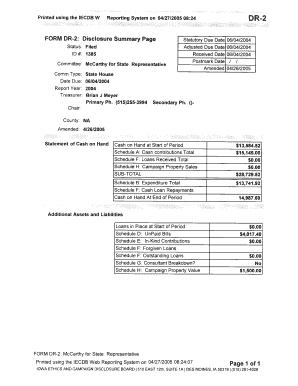
Get Printed Using The Iecdb W Reporting System On 04/27/2005 08 :24 Dr-2 Form Dr-2 : Disclosure Summary
How it works
-

Open form follow the instructions
-

Easily sign the form with your finger
-

Send filled & signed form or save
How to fill out the Printed Using The IECDB W Reporting System On 04/27/2005 08:24 DR-2 FORM DR-2: Disclosure Summary online
This guide provides you with comprehensive steps to efficiently fill out the Printed Using The IECDB W Reporting System On 04/27/2005 08:24 DR-2 FORM DR-2: Disclosure Summary. Each section of this form is detailed to assist users with varying levels of experience in document management.
Follow the steps to complete the Disclosure Summary form online.
- Click the ‘Get Form’ button to obtain the form and open it in an online editor.
- Enter the 'Committee Name' at the top of the form, ensuring it matches the name registered on the Statement of Organization.
- Fill in the 'Status' section by declaring if the form is filed. For most users, this should be marked accordingly.
- Input the 'ID #' assigned to this report, typically provided by the reporting system.
- Complete the 'Statutory Due Date' and 'Adjusted Due Date'. This information is crucial for timely reporting and compliance.
- Review the 'Treasurer's Information', including their name and contact numbers. Ensure accuracy for any inquiries.
- In the 'Statement of Cash on Hand' section, report all amounts in accordance with your committee's financial records.
- Complete all relevant schedules as indicated, such as Schedule A for contributions and Schedule B for expenditures.
- Verify all entries for completeness and correctness before final submission.
- Upon conclusion, save your changes. You may also download, print, or share the form as needed.
Complete your documents online to ensure prompt and accurate filing.
Industry-leading security and compliance
US Legal Forms protects your data by complying with industry-specific security standards.
-
In businnes since 199725+ years providing professional legal documents.
-
Accredited businessGuarantees that a business meets BBB accreditation standards in the US and Canada.
-
Secured by BraintreeValidated Level 1 PCI DSS compliant payment gateway that accepts most major credit and debit card brands from across the globe.