Loading
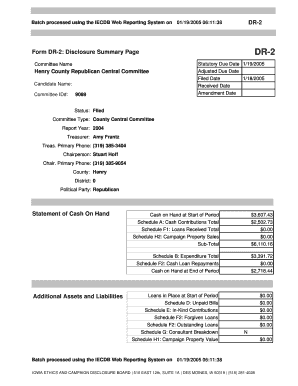
Get Batch Processed Using The Iecdb Web Reporting System On 01/19/2005 06:11:38 Dr-2 Form Dr-2
How it works
-

Open form follow the instructions
-

Easily sign the form with your finger
-

Send filled & signed form or save
How to fill out the Batch Processed Using The IECDB Web Reporting System On 01/19/2005 06:11:38 DR-2 Form DR-2 online
This guide provides clear and supportive instructions on completing the Batch Processed Using The IECDB Web Reporting System On 01/19/2005 06:11:38 DR-2 Form DR-2 online. By following these steps, users can ensure that their submissions are accurate and complete.
Follow the steps to successfully complete the form.
- Select the ‘Get Form’ button to access the form and open it in your online editing tool.
- Begin filling in the form by entering the committee name. For example, 'Henry County Republican Central Committee'.
- Input the candidate name and committee ID#, as indicated on your documents. For example, '9089' for the committee ID.
- Record the statutory due date, which is '01/19/2005'.
- Complete the fields for the filed date, received date, and any amendment date, following the continual forms data.
- Indicate the status of the form, ensuring that it reflects 'Filed'.
- Review all information for accuracy.
- Once satisfied, save your changes, and if required, download, print, or share the form as needed.
Complete your document filing online today to ensure compliance.
Industry-leading security and compliance
US Legal Forms protects your data by complying with industry-specific security standards.
-
In businnes since 199725+ years providing professional legal documents.
-
Accredited businessGuarantees that a business meets BBB accreditation standards in the US and Canada.
-
Secured by BraintreeValidated Level 1 PCI DSS compliant payment gateway that accepts most major credit and debit card brands from across the globe.