Loading
Get Ca Barbercosmo 03e-145 2019-2026
How it works
-

Open form follow the instructions
-

Easily sign the form with your finger
-

Send filled & signed form or save
How to fill out the CA BarberCosmo 03E-145 online
Completing the CA BarberCosmo 03E-145 form is essential for individuals seeking to validate their work experience from out of state or country. This guide will provide clear, step-by-step instructions to help you fill out this form accurately and efficiently.
Follow the steps to successfully complete the CA BarberCosmo 03E-145 form.
- Click ‘Get Form’ button to access the CA BarberCosmo 03E-145 online form.
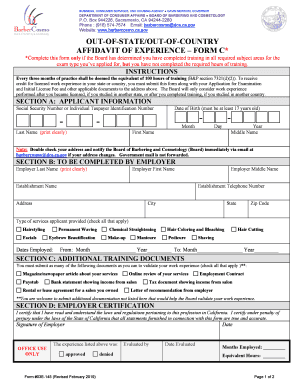
- Fill out Section A: Applicant Information. Provide your Social Security Number or Individual Taxpayer Identification Number, date of birth, last name, first name, and middle name. Ensure all information is clear and correct.
- Proceed to Section B: To Be Completed by Employer. Your employer should provide their last name, first name, middle name, establishment name, contact number, and address. They must also indicate the types of services you provided and list the dates of your employment.
- In Section C: Additional Training Documents, check off any documents you are submitting to validate your work experience. Include as many relevant documents as possible to support your application.
- Complete Section D: Employer Certification. Your employer must certify the accuracy of the information provided in this form by signing and dating this section.
- Once all sections are completed and reviewed for accuracy, you can save changes, download or print the form for submission.
Complete your form online today to ensure your application is processed smoothly.