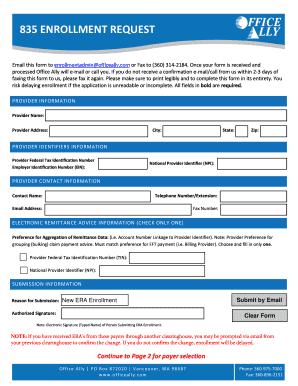
A confirmation e-mail/call from us within 2-3 days of faxing this form to us, please fax it again. Please make sure to print legibly and to complete this form in its entirety. You risk delaying enrollment if the application is unreadable or incomplete. All fields in bold are required. PROVIDER INFORMATION Provider Name: Provider Address: City: State: Zip: PROVIDER IDENTIFIERS INFORMATION Provider Federal Tax Identification Number Employer Identification Number (EIN): National Provider Iden.
Open form follow the instructions
Easily sign the form with your finger
Send filled & signed form or save
How to fill out the Office Ally 835 Enrollment Request online
This guide provides clear instructions on how to complete the Office Ally 835 Enrollment Request online. By following these steps, you will ensure that your enrollment process is accurate and efficient.
Follow the steps to complete your enrollment request.
- Click ‘Get Form’ button to access the Office Ally 835 Enrollment Request form and open it in your preferred online editor.
- In the provider information section, fill out the provider name, address, city, state, and zip code. Ensure all information is accurate to avoid delays.
- In the provider identifiers section, enter the federal tax identification number (EIN) followed by your national provider identifier (NPI). Double-check these values for correctness.
- Next, provide your contact information. This includes the contact name, telephone number with extension (if applicable), email address, and fax number.
- In the electronic remittance advice section, indicate your preference for aggregation of remittance data by selecting one option: either the provider federal tax identification number or the national provider identifier.
- For submission details, state the reason for submission, typically 'New ERA Enrollment,' and fill in the authorized signature to confirm your submission.
- Finally, check that all required fields marked in bold are filled out completely. Save your changes, download the form, and consider printing or sharing it as needed.
Complete your documents online today to ensure a smooth enrollment process.
Experience a faster way to fill out and sign forms on the web. Access the most extensive library of templates available.
Related content
▫ 835 file – Healthcare claim payment/advice. ... claim form, but is utilized by some...
EDI Enrollment Process for the 835 and EFT ... Please start ERA enrollment through your...
01 Introduction. 02 Investing in Boston's food chain workers. Bring workers' voices to the...
Get answers to your most pressing questions about US Legal Forms API.
What is the fax number for Office Ally?
The Inventory Reporting screen will look as follows: Page 2 Office Ally | P.O. Box 872020 | Vancouver, WA 98687 .officeally.com Phone: 360-975-7000 Fax: 360-896-2151 INVENTORY REPORTING 2.
What is the email address for Office Ally?
If you have any questions, please contact Office Ally's Customer Support by calling 1-866-575-4120 (toll free) or sending an email to info@officeally.com.
What is the phone number for Office Ally Edi?
- Standard Processing Time is approximately 14 days. - Once you receive confirmation that you've been linked to Office Ally, you MUST call (360-975-7000) or email Support@officeally.com with the below information PRIOR to submitting claims electronically.
Is Office Ally a clearinghouse?
All transactions for payers where Office Ally is the designated clearinghouse will be provided free of charge (these payers are identified on our payer list by a notation in the Note column). FEE FOR SERVICES.
How do I contact Office Ally support?
For questions regarding other Office Ally services (i.e. Practice Mate and EHR, claims issues, etc.), please continue to use our Customer Support telephone number at 866-575-4120.
How do I submit a claim to Office Ally?
0:23 3:06 Start by hovering over submit claims and selecting create claims. On the create new claim page youMoreStart by hovering over submit claims and selecting create claims. On the create new claim page you can create claims using quick entry. Or start with a blank. Form utilizing quick entry.
Use professional pre-built templates to fill in and sign documents online faster. Get access to thousands of forms.
If you believe that this page should be taken down, please follow our DMCA take down process here.