Loading
Get Ca Liberty Dental Plan Provider Credentialing Application 2016-2026
How it works
-

Open form follow the instructions
-

Easily sign the form with your finger
-

Send filled & signed form or save
How to fill out the CA Liberty Dental Plan Provider Credentialing Application online
Completing the CA Liberty Dental Plan Provider Credentialing Application online can be straightforward with the right guidance. This guide offers clear steps to assist you in filling out each section accurately.
Follow the steps to successfully complete your application.
- Press the ‘Get Form’ button to retrieve the application and open it in your preferred editor.
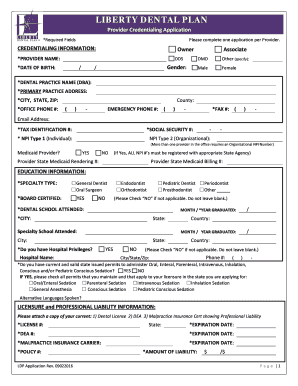
- Begin by selecting your credentialing information. Indicate your role as either an owner or associate, and fill in your provider name, date of birth, and gender as required.
- Provide your dental practice name and primary practice address, including city, state, and zip code. Also, include your email address and office phone number.
- Next, input your tax identification number and social security number. Enter your National Provider Identifier (NPI) numbers, ensuring to specify if you require an organizational NPI number.
- In the education section, select your specialty type and indicate if you are board certified. Specify the dental school attended and your graduation date. Include any additional specialty schooling if applicable.
- Provide details regarding your licensure, including your license number, expiration date, DEA number, and malpractice insurance information.
- Complete the five-year work history section by listing your dental practice locations, employment dates, and addressing any gaps in employment.
- Answer all professional questions and attestations accurately. If any responses are 'yes,' provide detailed explanations as required.
- Review your application for accuracy before submitting. Ensure that all required fields are filled, and no sections are left blank.
- Finalize your application by digitally signing it, entering your printed name, and the date. After completing all fields, save the document, and you may choose to download, print, or share it as needed.
Start filling out your CA Liberty Dental Plan Provider Credentialing Application online today.
0:08 0:50 How to Combine Two Images Together On Android - YouTube YouTube Start of suggested clip End of suggested clip Then go to collage. Select. Any two images. Click on Create and there you go now you have two imagesMoreThen go to collage. Select. Any two images. Click on Create and there you go now you have two images side by side you can crop zoom them as you want and you can click on Save.