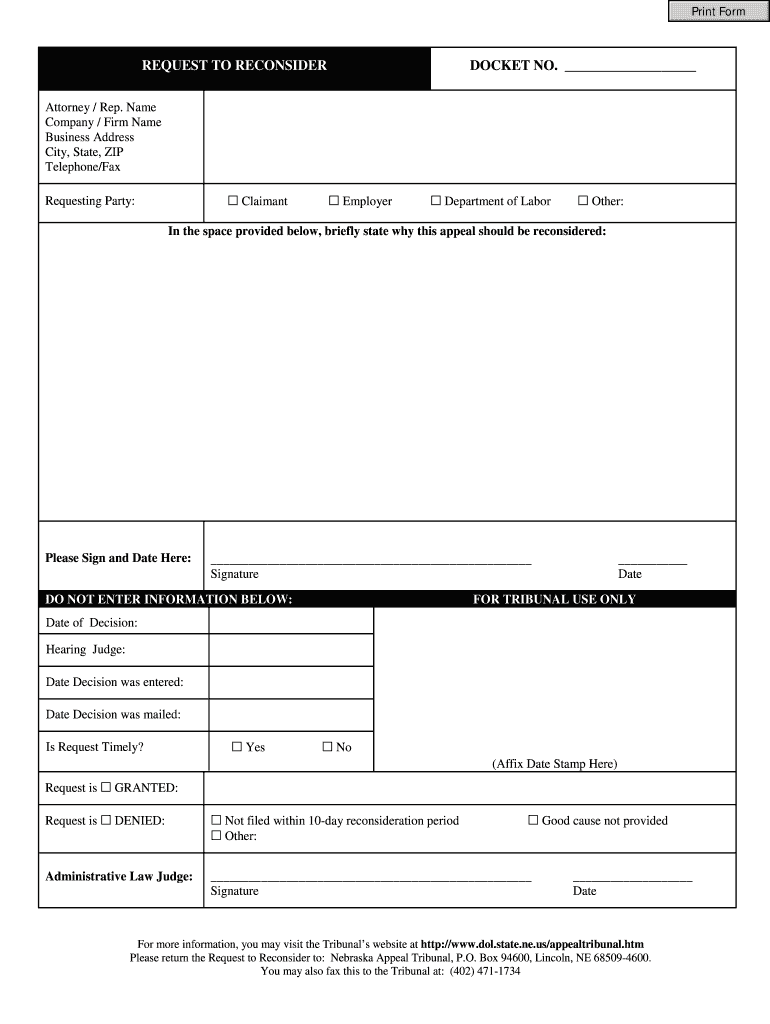
Er G Department of Labor G Other: In the space provided below, briefly state why this appeal should be reconsidered: Please Sign and Date Here: ___________________________________________________ Signature DO NOT ENTER INFORMATION BELOW: ___________ Date FOR TRIBUNAL USE ONLY Date of Decision: Hearing Judge: Date Decision was entered: Date Decision was mailed: Is Request Timely? G Yes G No (Affix Date Stamp Here) Request is G GRANTED: Request is G DENIED: G Not filed within 10-day r.
Loading

Open form follow the instructions

Easily sign the form with your finger

Send filled & signed form or save
How to fill out the NE Request to Reconsider online
This guide provides step-by-step instructions on how to complete the NE Request to Reconsider form online. Whether you are unfamiliar with legal documents or simply need a refresher, this comprehensive guide will assist you in navigating through the process effortlessly.
Follow the steps to complete your NE Request to Reconsider form online.
- Press the ‘Get Form’ button to access the form online and open it in your preferred editor.
- Enter your docket number in the designated space at the top of the form. This information is typically provided in your original decision or communication from the tribunal.
- Fill in the Attorney/Representative section with the name of your attorney or representative, if applicable. If you are filing without representation, you may leave this section blank.
- Provide the Company/Firm Name in the next field. Again, if this does not apply to you, you may skip this.
- Complete the Business Address with the complete street address, including city, state, and ZIP code. Ensure that this information is accurate, as it will be used for correspondence.
- Include your telephone number and fax number in the respective fields, if available. This allows for easier communication regarding your request.
- Indicate the requesting party by checking the appropriate box: Claimant, Employer, Department of Labor, or Other. If selecting 'Other,' please specify in the space provided.
- In the provided space, briefly describe why you believe the decision should be reconsidered. Be concise and clear in your reasoning to ensure understanding.
- Sign and date the form where indicated. This is to certify that the information you provided is true and accurate.
- Avoid filling out the section designated for tribunal use only as this will be completed by the tribunal staff after submission.
- Once you have filled out all applicable sections, you can save your changes, download the form, print it, or share it for further assistance.
Complete your NE Request to Reconsider online today for an easier and more efficient process.
Experience a faster way to fill out and sign forms on the web. Access the most extensive library of templates available.
Related content
The claimant requests that this matter is reconsidered. The claimant did file a timely...
A party dissatisfied with the Division 's decision may request reconsideration by filing a...
Please submit the request by visiting our Provider Portal, or fax to (800) 499-3406. •...
Get answers to your most pressing questions about US Legal Forms API.
How to make a mandatory reconsideration?
Making a mandatory reconsideration involves understanding the specific grounds on which you can challenge a decision. You will need to formally submit your request, including the necessary forms and supporting documents. The NE Request to Reconsider can guide you on how to approach this process effectively and enhance your chances of a successful outcome.
How to email for reconsideration?
To email for reconsideration, start with a clear subject line that indicates the purpose of your email. Begin your message by briefly identifying the original decision and express your desire for it to be reconsidered. Be sure to outline your reasons logically and respectfully while keeping the tone professional to encourage a productive response.
How to write a request for reconsideration?
When writing a request for reconsideration, begin with a formal greeting and clearly state the purpose of your communication. Include details about the original decision and provide well-structured arguments that justify your request. Always be polite, concise, and aim to persuade without being confrontational, emphasizing the importance of your appeal.
What is the best way to ask for a mandatory reconsideration?
The best way to ask for a mandatory reconsideration is to directly address the authority responsible for the decision. Be clear about your reasons for requesting this reconsideration, referencing the NE Request to Reconsider as relevant legislation. Craft your request to highlight any errors or overlooked information that could impact the outcome.
How to submit a reconsideration request?
Submitting a reconsideration request requires you to identify the correct channel for submission based on the specifics of your situation. This could either be via email or a formal letter, depending on your needs. It is important to ensure that your request is professional, direct, and includes all necessary supporting evidence to strengthen your case.
How to put a reconsideration request?
To put a reconsideration request in motion, start by gathering all relevant documents and information that support your case. Clearly outline your request in writing, emphasizing the NE Request to Reconsider as part of your approach. Ensure you adhere to any outlined protocols for submissions to enhance the chances of a positive outcome.
How to make a reconsideration request?
Making a reconsideration request involves drafting a clear and concise letter or email to the appropriate party. Begin by stating your original request and the decision made. Then, provide specific reasons and supporting information for why you believe the decision should change, using the NE Request to Reconsider as a framework to structure your argument effectively.
How do you politely ask someone to reconsider?
To politely ask someone to reconsider, approach the person respectfully and express your appreciation for their original decision. Clearly state your reasons for requesting a reconsideration, maintaining a positive tone throughout. Using phrases such as 'I would appreciate your reassessment' can convey respect while keeping the conversation constructive.
What disqualifies you from unemployment in NE?
Several factors may disqualify you from receiving unemployment benefits in Nebraska, including voluntary resignation, lack of available work, or failing to meet eligibility requirements. Additionally, if you are found to have committed misconduct, it can lead to disqualification. It is crucial to stay informed about these criteria, as this knowledge can assist you if you need to make a NE Request to Reconsider.
How much is the weekly unemployment benefit amount in Nebraska?
The weekly unemployment benefit amount in Nebraska can range from $125 to $420, depending on your prior earnings. The exact amount you receive will reflect your previous wages and is capped at a certain level. It is important to understand how benefits are calculated so that you can plan accordingly. If you feel your benefit amount is incorrect, a NE Request to Reconsider may be necessary.
Use professional pre-built templates to fill in and sign documents online faster. Get access to thousands of forms.
If you believe that this page should be taken down, please follow our DMCA take down process here.