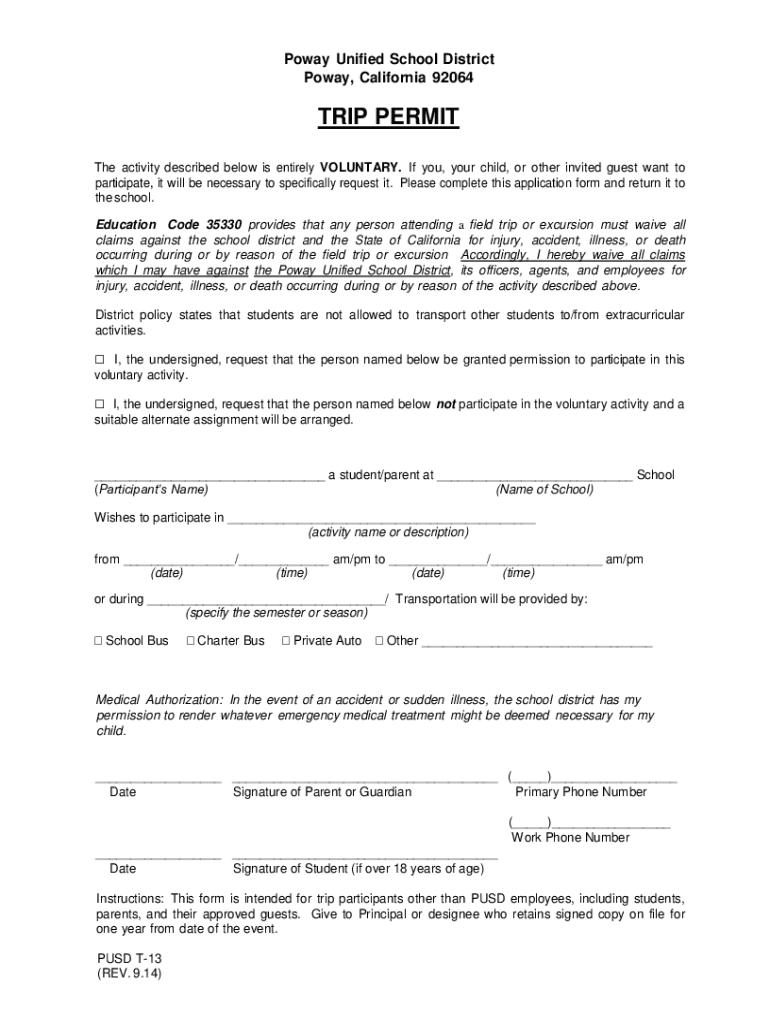
Poway Unified School District Poway, California 92064TRIP PERMIT The activity described below is entirely VOLUNTARY. If you, your child, or other invited guest want to participate, it will be necessary.

Open form follow the instructions

Easily sign the form with your finger

Send filled & signed form or save
How to fill out the CA Poway Unified School District T-13 online
Completing the CA Poway Unified School District T-13 form is essential for participation in school-sponsored activities. This guide will help you understand each section of the form and provide clear instructions to fill it out correctly.
Follow the steps to complete the T-13 form successfully.
- Click ‘Get Form’ button to obtain the form and open it in the editor.
- Start by providing the participant's name and the name of the school in the designated fields.
- Indicate the activity they wish to participate in by writing the activity name or description in the appropriate field.
- Specify the date and time of the activity, ensuring to fill in both the start and end times.
- Choose the transportation method by selecting one of the provided options: School Bus, Charter Bus, Private Auto, or Other.
- Complete the medical authorization section, giving permission for emergency medical treatment if necessary.
- Sign and date the form as a parent or guardian. If the participant is over 18 years of age, they should also provide their signature.
- Provide primary and work phone numbers for contact purposes.
- Once the form is filled out, review it for accuracy, then save changes, download, print, or share the form as needed.
Complete your forms online today for a smooth and successful participation in school activities.
Experience a faster way to fill out and sign forms on the web. Access the most extensive library of templates available.
Related content
May 26, 2015 — Attached, please find an executed copy of SDG&E's Entry Permit solely for...
Poway Unified School District (PUSD), TK- Adult Public Education, located in San ... PUSD...
Tijuana is the largest city of both Baja California State and the Baja California...
Get answers to your most pressing questions about US Legal Forms API.
What is the dress code for Poway Unified School District?
Dresses, skirts and shorts shall be at least mid-thigh length (to fingertips when arms are extended to one's side). Underwear-type sleeveless shirts,see-through or fishnet fabrics, or other attire, which exposes the body in a sexually suggestive manner, shall not be permitted.
Where is the best school district in California?
Here is the list of the best school districts in California (CA). Los Gatos-Saratoga Joint Union High School District (Los Gatos) ... Palo Alto Unified School District (Palo Alto) ... La Cañada Unified School District (La Cañada) ... Mountain View-Los Altos Union High School District (Mountain View)
Is Poway school district good?
Poway Unified School District is a top rated, public school district located in SAN DIEGO, CA.
What is the budget for Poway Unified School District?
The text description of the above chart is as follows: Poway Unified School District plans to spend $479,070,133 for the 2022-23 school year. Of that amount, $64,879,566 is tied to actions/services in the LCAP and $414,190,566 is not included in the LCAP.
What school districts are good in San Diego?
The 10 Best Schools Districts in San Diego DistrictStudent-Teacher Ratio1Coronado Unified School District19.22San Dieguito Union High School District25.23San Marcos Unified School District24.84Poway Unified School District23.47 more rows • Mar 1, 2023
What are the best schools in San Diego County?
Preuss School UCSD. La Jolla, CA. Preuss School UCSD District. ... Canyon Crest Academy. San Diego, CA. ... Del Norte High School. San Diego, CA. ... Westview High School. San Diego, CA. ... Sage Creek High School. Carlsbad, CA. ... Mt. Everest Academy. ... Del Lago Academy - Campus of Applied Science. Escondido, CA. ... Scripps Ranch High School. San Diego, CA.
How do I contact Poway Unified School District?
Poway Unified School District ? Page · Public School. ? 15250 Avenue of Science, San Diego, CA, United. States, California. ? (858) 521-2800. ? pusdsocial@powayusd.com. ? powayusd.com. ? Closed now. ? See More About Poway Unified School District.
What is the #1 school in San Diego?
The top ranked public high schools in San Diego County, CA are Scripps Ranch High School, Coronado High School and University City High School. Overall testing rank is based on a school's combined math and reading proficiency test score ranking.
Use professional pre-built templates to fill in and sign documents online faster. Get access to thousands of forms.
If you believe that this page should be taken down, please follow our DMCA take down process here.