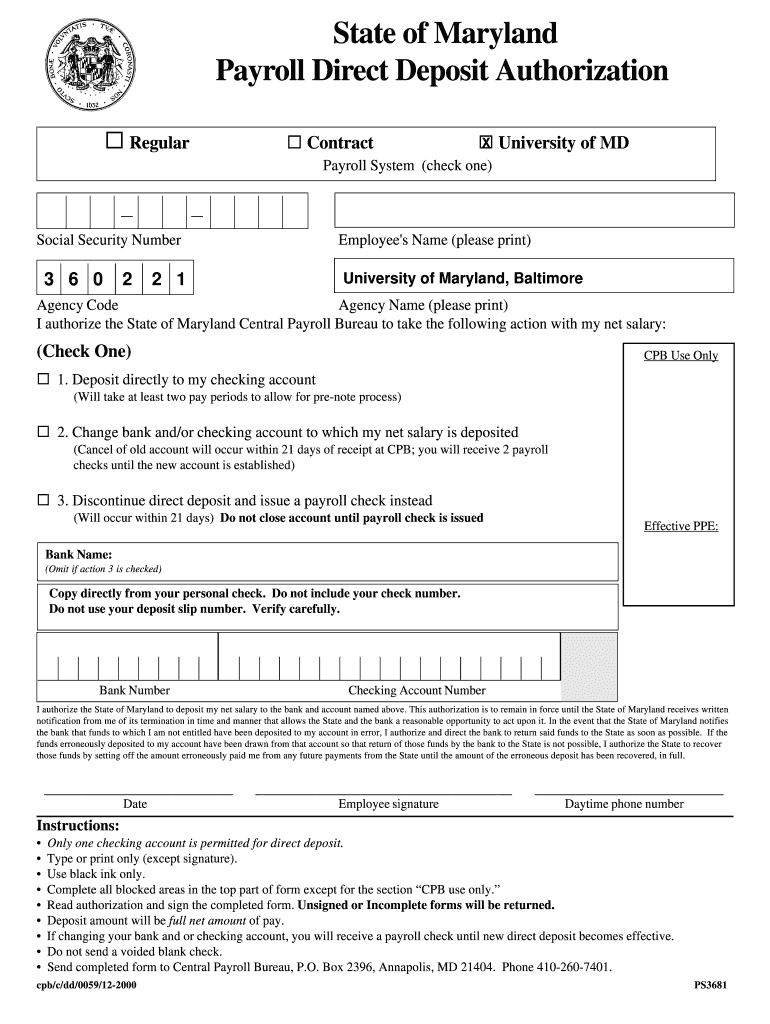
Versity of Maryland, Baltimore Agency Code Agency Name (please print) I authorize the State of Maryland Central Payroll Bureau to take the following action with my net salary: (Check One) CPB Use Only ! 1. Deposit directly to my checking account (Will take at least two pay periods to allow for pre-note process) ! 2. Change bank and/or checking account to which my net salary is deposited (Cancel of old account will occur within 21 days of receipt at CPB; you will receive 2 payroll checks unt.
Loading

Open form follow the instructions

Easily sign the form with your finger

Send filled & signed form or save
How to fill out the MD PS3681 online
Filling out the MD PS3681 form for payroll direct deposit authorization is an essential step for employees of the University of Maryland. This guide provides clear, step-by-step instructions to help users complete the form accurately and efficiently.
Follow the steps to complete the MD PS3681 form online.
- Click ‘Get Form’ button to obtain the form and open it in the editor.
- Begin by selecting the type of employment you are applying for: Regular or Contract. Check the appropriate box next to 'Payroll System'.
- Enter your Social Security Number carefully in the designated field.
- Print your full name in the 'Employee's Name' section. Make sure to use clear and legible handwriting.
- In the 'Agency Code' field, enter the code associated with the University of Maryland, Baltimore.
- Indicate the action you would like to take regarding your net salary by checking one of the three options provided: deposit to your checking account, change the bank account, or discontinue direct deposit.
- If applicable, provide the effective payroll period ending (PPE) date in the designated area.
- For direct deposit options, fill in your bank name and ensure you copy the information directly from your personal check, excluding the check number.
- Enter your bank routing number and checking account number carefully, verifying the details to avoid errors.
- Read the authorization statement carefully. Your signature will affirm your agreement with the terms outlined.
- Date the form accurately and provide your signature in the designated area.
- Include your daytime phone number to facilitate any follow-up communications.
- Review the entire form for completeness and ensure it is signed. Unsigned or incomplete forms will be returned.
- Once completed, send the MD PS3681 form to the Central Payroll Bureau at the specified address.
Start filling out your MD PS3681 form online today for a seamless payroll process.
Experience a faster way to fill out and sign forms on the web. Access the most extensive library of templates available.
Related content
I authorize the State of Maryland to deposit my net salary to the bank and account named...
I authorize the State of Maryland to deposit my net salary to the bank and account named...
Get answers to your most pressing questions about US Legal Forms API.
How to fill out a 15 H form?
Filling out a 15 H form involves providing your personal and financial information, including your age and income details. You will need to specify that your annual income is below the exemption limit. Signing the form certifies that the information is correct. MD PS3681 offers resources to help you through this process effectively.
How to fill out EZ tax form?
To fill out an EZ tax form, start by entering your personal information, such as name and address. Then, list your income sources and any eligible deductions, ensuring you stay within the qualifications for this simplified option. Be precise, as inaccuracies can delay processing. For detailed steps, use MD PS3681 for additional support.
How to fill out a withholding exemption form?
To fill out a withholding exemption form, you begin by entering your personal details, including name and Social Security number. Next, indicate the reasons for your exemption, ensuring you meet the criteria. It's often helpful to refer to the MD PS3681 resources to better understand your eligibility and requirements.
How to fill form 15G step by step?
Filling form 15G requires a systematic approach. Start by entering your name, PAN, and contact details. Next, provide information about your income sources and enter the aggregate amount expected for the year. Finally, sign the declaration and submit the form to your bank or financial institution. The MD PS3681 tool on US Legal Forms can guide you through each step.
What is the aggregate amount in form 15G with an example?
The aggregate amount in form 15G refers to the total income that you expect to earn during the financial year. For instance, if your bank deposits and other sources yield an estimated income of $2,000 and it falls below the taxable limit, this amount must be reflected in the form. By using MD PS3681, you can ensure accuracy in reporting your aggregate income.
What is form 15G with an example?
Form 15G is a self-declaration form used to ensure that no tax is deducted on your interest income. For example, if you earn income from fixed deposits and your total income is below the taxable limit, submitting form 15G will prevent TDS from being applied. Understanding how to correctly fill out this form is crucial, and MD PS3681 can help simplify that process.
What is the exemption limit for 15H for senior citizens?
The exemption limit for form 15H allows senior citizens to claim tax benefits without requiring tax deduction at source on their income. As of the current tax year, individuals present can claim this exemption if their total income falls below the specified limit. Be sure to check the most recent guidelines, as these limits can change annually. Utilize the resources available in MD PS3681 for updated information.
How to fill out medical authorization form?
Filling out a medical authorization form involves providing your personal details, such as name and contact information. You also need to specify the healthcare provider who has access to your records. Make sure to include any relevant medical information and sign the form to authorize its use. For assistance, consider using the MD PS3681 feature on US Legal Forms.
How to close a non-profit organization in Maryland?
Closing a nonprofit organization in Maryland involves a specific process, including filing dissolution documents with the Maryland Secretary of State. You must also settle any outstanding debts and distribute remaining assets according to your bylaws. For a detailed guide tailored to MD PS3681, consider using USLegalForms as a comprehensive resource to streamline the dissolution process.
Is it possible to sue a non-profit organization?
Yes, it is possible to sue a nonprofit organization in Maryland under certain circumstances. Individuals may pursue legal action for issues like breach of contract, negligence, or violation of state laws. Understanding the implications of MD PS3681 can provide clarity on the legal avenues available for those seeking justice against nonprofit entities.
Use professional pre-built templates to fill in and sign documents online faster. Get access to thousands of forms.
If you believe that this page should be taken down, please follow our DMCA take down process here.