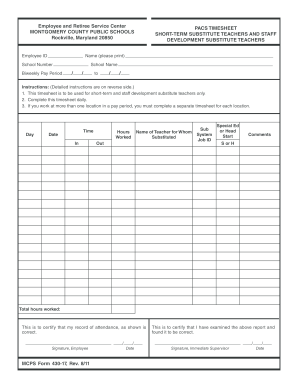
Hers Name (please print) School Number Biweekly Pay Period School Name / / to / / Instructions: (Detailed instructions are on reverse side.) 1. This timesheet is to be used for short-term and staff development substitute teachers only. 2. Complete this timesheet daily. 3. If you work at more than one location in a pay period, you must complete a separate timesheet for each location. Day Time Date In Hours Worked Name of Teacher for Whom Substituted Ou.
Open form follow the instructions
Easily sign the form with your finger
Send filled & signed form or save
How to fill out the MD MCPS 430-17 online
This guide provides detailed instructions on completing the MD MCPS 430-17 form for short-term and staff development substitute teachers. Follow the steps outlined below to ensure accurate and timely submission of your timesheet.
Follow the steps to effectively complete the MD MCPS 430-17 form online.
- Click ‘Get Form’ button to obtain the form and open it for editing.
- Begin by filling in your employee ID, which is essential for time verification.
- Enter your full name as it appears in official records.
- Specify the biweekly pay period by entering the start and end dates.
- Provide the location code and name where you worked.
- For each day worked, fill out a new line by entering the day of the week and the exact date.
- Document your time in and out by noting the start and end times for each work session.
- Record the total hours worked for each day, making sure to not exceed 7 hours.
- Indicate the name of the teacher for whom you substituted.
- Input the Substitute Calling System Job ID as assigned through the system.
- If applicable, note if you substituted for a Special Education teacher by entering 'S' or for a Head Start teacher by entering 'H' in the designated columns.
- At the end of the pay period, total all hours worked for that location and enter the final sum.
- Finally, review your timesheet for accuracy, sign and date it, then submit it to your immediate supervisor for their signature.
- Once signed by your supervisor, submit the completed timesheet to the timekeeper.
Complete your MD MCPS 430-17 form online today!
Experience a faster way to fill out and sign forms on the web. Access the most extensive library of templates available.
Related content
by W Freppel · 2024 · Cited by 15 — Chikungunya virus (CHIKV) is a...
by R Prager · 1930 — ADS Classic is now deprecated. It will be completely retired in...
Get answers to your most pressing questions about US Legal Forms API.
How to connect to mcps wifi?
Connecting to MCPS WiFi involves a few simple steps. Open your device's WiFi settings, find the MCPS network, and select it. Enter the password given by your school or available in official resources. This connection allows access to educational content linked with MD MCPS 430-17, enhancing your learning experience.
How many students are in MCPS Maryland?
As of the latest data, Montgomery County Public Schools (MCPS) has over 160,000 students enrolled. This diverse student body benefits from various programs and initiatives, including those associated with MD MCPS 430-17. The strong community focus supports educational growth and integration.
What is the password for Montgomery Public Schools WiFi?
The WiFi password for Montgomery Public Schools may vary by location and is often shared through official communication. If you cannot find it, check with your school's office or district communications. Accessing this WiFi connects you to crucial services, including resources relevant to MD MCPS 430-17.
How do I connect to BCPS WiFi?
Connecting to BCPS WiFi is straightforward. Begin by accessing the WiFi settings on your device and locating the BCPS network. Once selected, input the required password, typically available from school communications or your administration. This enables you to take full advantage of the educational tools linked to MD MCPS 430-17.
How do I connect to MB WiFi?
To connect to MB WiFi, first ensure your device's WiFi is turned on. Look for the MB WiFi network in your settings and select it. Enter the password, which you can often find posted in community areas or contact your local IT support for assistance. This connection provides access to essential resources, including the MD MCPS 430-17 features.
How do I contact Montgomery public schools?
You can contact Montgomery public schools directly by calling their main line at (301) 279-3673. This number provides access to various departments including enrollment and administration. For specific inquiries about MD MCPS 430-17, refer to their website for additional resources and contact options.
What is the phone number for Montgomery County?
To contact Montgomery County, you can dial (240) 777-0311, which connects you to general county services. This number is user-friendly and helps you navigate various county operations. If you need information specifically about MD MCPS 430-17, this line can direct you to the right department.
What is the age cut off for Montgomery County Public Schools?
The age cut-off for enrollment in Montgomery County Public Schools is typically the Maryland state requirement of five years old by September 1. This requirement ensures that students start kindergarten at the appropriate age. For more details about age eligibility related to MD MCPS 430-17, please check the MCPS website or contact their enrollment office.
How do I contact Montgomery County Maryland?
To contact Montgomery County Maryland, you can call their general information line at (240) 777-0311. This line provides assistance with various services and departments. You can also visit their official website for additional contact information related to MD MCPS 430-17 services.
Is MCPS part of Montgomery County government?
Montgomery County Public Schools (MCPS) is a public school district that serves Montgomery County, Maryland. With 210 schools in 2023, it is the largest school district in the state of Maryland.
Use professional pre-built templates to fill in and sign documents online faster. Get access to thousands of forms.
If you believe that this page should be taken down, please follow our DMCA take down process here.