Loading
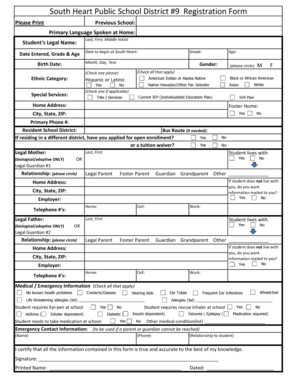
Get Nd South Heart Public School District 9 Registration Form 2013-2025
How it works
-

Open form follow the instructions
-

Easily sign the form with your finger
-

Send filled & signed form or save
How to fill out the ND South Heart Public School District 9 Registration Form online
Filling out the ND South Heart Public School District 9 Registration Form online is a straightforward process. This guide provides you with clear, step-by-step instructions to help you complete the form accurately and efficiently.
Follow the steps to complete the registration form online
- Click the ‘Get Form’ button to acquire the form and open it in the editor.
- Begin by entering the previous school your child attended, if applicable, and the primary language spoken at home. This information helps the school better understand your child's background.
- Fill out the student's legal name, including the last name, first name, and middle initial. Additionally, provide the date your child will begin attending South Heart and their grade level.
- Next, input the student's birthdate and gender. For the ethnic category, check the appropriate box to indicate whether the student identifies as Hispanic or Latino, and select other categories that apply.
- Indicate any special services your child may require, such as an Individualized Education Plan (IEP), Title I services, or a 504 Plan.
- Complete the home address section, including the city, state, and ZIP code. Additionally, provide a primary phone number and indicate the resident school district.
- If relevant, specify if there is a need for a bus route and indicate whether you have applied for open enrollment or a tuition waiver.
- Fill in the legal mother and father’s names, checking the boxes that indicate they are biological or adoptive. Specify if the student lives with either parent or a legal guardian, and if you'd like information mailed to you.
- Provide medical information by checking all that apply, noting any known health problems, allergies, or medical conditions that the school should be aware of for your child.
- List emergency contact information for someone who can be reached if a parent or guardian is not available.
- Finally, verify all information provided is accurate by signing and dating the form before submitting. Save changes, download, print, or share the form as needed to complete the registration process.
Complete the ND South Heart Public School District 9 Registration Form online today to ensure your child is ready for the upcoming school year.
Related links form
UCN-22338: Representations And Certifications (Word) - Y12 Doe
Infrastructure And Facilities Improvement Program (DEO-114). Infrastructure And Facilities
Town Of Dewey Beach Dog License Bapplicationb And Bb - Team-Logic
Player Registration Las Vegas - USMC Toys For Tots Golf Tournament ... - Toysfortotsvegas
Industry-leading security and compliance
US Legal Forms protects your data by complying with industry-specific security standards.
-
In businnes since 199725+ years providing professional legal documents.
-
Accredited businessGuarantees that a business meets BBB accreditation standards in the US and Canada.
-
Secured by BraintreeValidated Level 1 PCI DSS compliant payment gateway that accepts most major credit and debit card brands from across the globe.