Loading
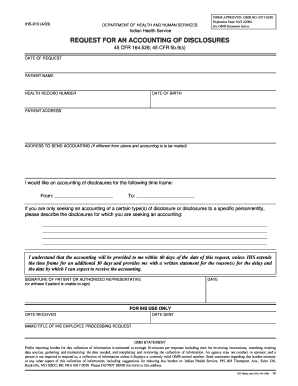
Get Address To Send Accounting (if Different From Above And Accounting Is To Be Mailed)
How it works
-

Open form follow the instructions
-

Easily sign the form with your finger
-

Send filled & signed form or save
How to fill out the ADDRESS TO SEND ACCOUNTING (If different from above and accounting is to be mailed) online
Filling out the ADDRESS TO SEND ACCOUNTING form is an essential step for individuals seeking an accounting of disclosures related to their health records. This guide provides clear, step-by-step instructions to ensure you complete the form accurately and efficiently.
Follow the steps to successfully complete the form online.
- Click ‘Get Form’ button to access the form and open it in the available editor.
- Begin by entering the date of your request in the designated field. This information is crucial for processing your request in a timely manner.
- Fill in the patient's name accurately as it appears in the health records. This ensures there are no discrepancies during the accounting process.
- Provide the health record number associated with the patient. This number helps identify the specific records that need to be reviewed.
- Enter the date of birth of the patient to further confirm their identity and association with the health records.
- Complete the patient address section with the current address to ensure that any correspondence is sent to the right location.
- For the ADDRESS TO SEND ACCOUNTING field, input a different mailing address if it is distinct from the patient's address above. This is where the accounting will be sent.
- Specify the time frame for which you would like an accounting of disclosures by entering a start date and an end date.
- If you are requesting a specific type of disclosure, describe these disclosures in the provided section to clarify your request.
- Confirm your understanding that the accounting will be provided within 60 days, unless an extension is necessary, and complete the signature section to validate your request.
- Finally, review the completed form for accuracy, and then save your changes. You can choose to download, print, or share the completed form as needed.
Complete your documentation efficiently by filling out the form online today.
Mail For retirees:For annuitants, beneficiaries and survivors: Defense Finance and Accounting Service U.S. Military Retired Pay 8899 E 56th Street Indianapolis, IN 46249-1200 Defense Finance and Accounting Service U.S. Military Annuitant Pay 8899 E 56th Street Indianapolis, IN 46249-1300
Industry-leading security and compliance
US Legal Forms protects your data by complying with industry-specific security standards.
-
In businnes since 199725+ years providing professional legal documents.
-
Accredited businessGuarantees that a business meets BBB accreditation standards in the US and Canada.
-
Secured by BraintreeValidated Level 1 PCI DSS compliant payment gateway that accepts most major credit and debit card brands from across the globe.