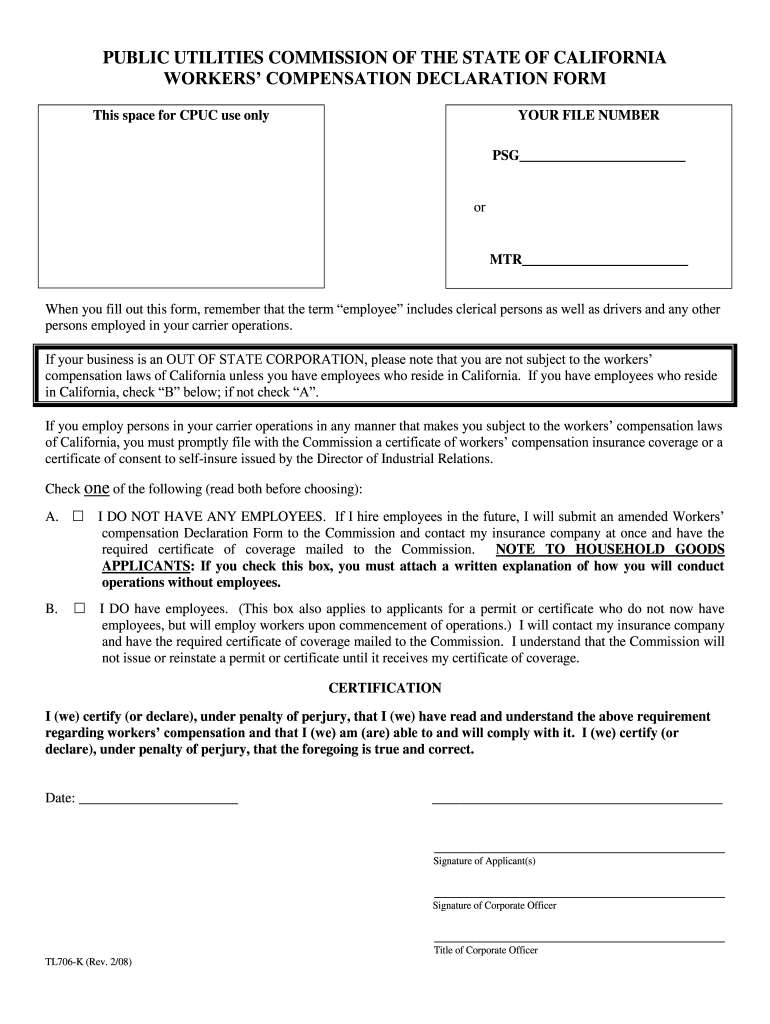
_______ When you fill out this form, remember that the term “employee” includes clerical persons as well as drivers and any other persons employed in your carrier operations. If your business is an OUT OF STATE CORPORATION, please note that you are not subject to the workers’ compensation laws of California unless you have employees who reside in California. If you have employees who reside in California, check “B” below; if not check “A”. If you employ persons in your carrier oper.
Loading

Open form follow the instructions

Easily sign the form with your finger

Send filled & signed form or save
How to fill out the CA TL706-K online
The CA TL706-K is a vital document for businesses subject to California workers' compensation laws. This guide provides a clear and straightforward process for completing the form online, ensuring compliance and understanding of your responsibilities.
Follow the steps to accurately complete the CA TL706-K online.
- Begin by locating and selecting the ‘Get Form’ button to obtain the CA TL706-K. This action allows you to open the form in a digital environment for completion.
- Identify your file number from the options provided: PSG or MTR. Enter the appropriate number in the designated field.
- Determine your employment status by selecting one of the two options: check ‘A’ if you do not have any employees, or check ‘B’ if you do have employees residing in California.
- If you select ‘A’ (no employees), you must include a written explanation of how you will operate without employees as an attachment.
- If you select ‘B’ (you have employees), indicate that you will contact your insurance company to have the required certificate of coverage mailed to the Commission.
- Complete the certification section by reading the statement carefully. Confirm that you understand and agree to the requirements by signing the form.
- Ensure all relevant fields are filled out, including the date and the signatures of the applicant and corporate officer, along with their titles.
- After completing the form, save your changes. You can then download, print, or share the CA TL706-K as needed.
Complete your documents online to ensure compliance and efficiency.
Experience a faster way to fill out and sign forms on the web. Access the most extensive library of templates available.
Related content
TL 706-K (Rev. 09/2018). PUBLIC UTILITIES COMMISSION OF THE STATE OF CALIFORNIA. WORKERS'...
by R Hershler · 2007 · Cited by 19 — ABSTRACT. The large, western North American...
Get answers to your most pressing questions about US Legal Forms API.
How to fill out CA Live Scan form?
Filling out the CA Live Scan form requires you to provide personal information accurately. You will need to include your name, address, date of birth, and the purpose of your scan, linking it to the CA TL706-K. Once you have filled out the form, review it carefully for any errors before submission. This step is critical for ensuring swift processing of your background check.
How much do Live Scan operators make in California?
The income for Live Scan operators in California varies depending on experience, location, and the specific employer. On average, operators can expect to earn a competitive wage, often ranging from $15 to $25 per hour. This occupation plays an essential role in the processing of CA TL706-K applications, contributing to public safety and effective background screenings.
What shows up on a Live Scan background check in California?
A Live Scan background check in California reveals various records based on your fingerprints. Typically, it includes criminal history, if any, along with information like arrests or convictions. This information plays a crucial role in many licensing and employment processes, particularly relevant to the CA TL706-K. Always remember that detail accuracy is vital, as any discrepancies may lead to further inquiries.
How to fill out a fingerprint card in California?
To fill out a fingerprint card in California, you need to provide a few basic details. Start by writing your name, date of birth, and other identifying information in the designated sections. Be sure to print clearly and use black ink. Once completed, you can submit the fingerprint card along with your application, ensuring you adhere to the requirements for the CA TL706-K process.
Can you waive a workers' compensation claim in California?
Waiving a workers' compensation claim in California is not straightforward and usually not permitted. The law is designed to protect injured workers by providing them essential benefits. Understanding how the CA TL706-K applies to your situation can provide you with the guidance needed to navigate these complex issues.
How do I become exempt from workers comp in California?
To become exempt from workers' compensation insurance in California, you typically need to meet specific criteria, often related to your business structure or employee classification. It's essential to formally document your exemption request to ensure compliance with legal requirements. The CA TL706-K offers insights that can help clarify this process.
How to avoid workers' comp claims?
Preventing workers' comp claims starts with maintaining a safe work environment and providing proper training for employees. Regular safety audits and open communication can significantly reduce the chances of accidents. You can also consider documenting best practices, which may include references to the CA TL706-K, to reinforce your commitment to employee safety.
What is a workers' compensation coverage waiver?
A workers' compensation coverage waiver allows certain individuals, such as business owners, to opt out of standard coverage requirements. This waiver can be a strategic decision but must be handled with caution. If you are considering this option, reviewing the details in the CA TL706-K will provide clarity on potential risks and benefits.
Can you waive workers' compensation rights in California?
Waiving your workers' compensation rights in California is generally not allowed. The state has established these rights to protect employees, ensuring they receive necessary support for work-related injuries. Consequently, understanding the implications of the CA TL706-K can help you navigate your rights effectively.
Who is exempt from workers' compensation insurance in California?
In California, certain groups may be exempt from workers' compensation insurance. This includes independent contractors and certain business owners. If you fall into one of these categories, it’s crucial to ensure you understand the requirements outlined in documents like the CA TL706-K to confirm your exemption status.
Use professional pre-built templates to fill in and sign documents online faster. Get access to thousands of forms.
If you believe that this page should be taken down, please follow our DMCA take down process here.