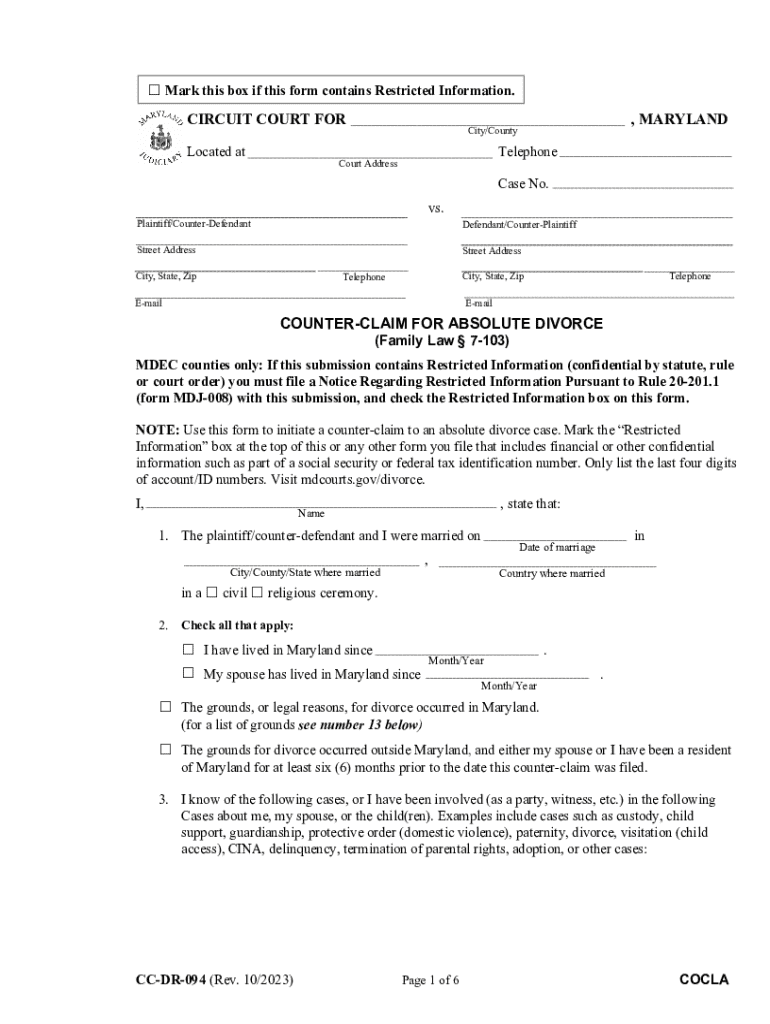
Mark this box if this form contains Restricted Information.CIRCUIT COURT FOR Located at, MARYLANDCity/CountyTelephoneCourt AddressCase No. vs.Plaintiff/CounterDefendantDefendant/CounterPlaintiffStreet.
Loading

Open form follow the instructions

Easily sign the form with your finger

Send filled & signed form or save
How to fill out the Counter-claim For Limited Divorce - Cloudfront.net online
This guide provides step-by-step instructions on completing the Counter-claim for Limited Divorce form online. It aims to support users by offering clear and accessible guidance through each section of the document, ensuring a smooth filing process.
Follow the steps to fill out your Counter-claim for Limited Divorce form.
- Press the ‘Get Form’ button to access the Counter-claim for Limited Divorce form and open it in your online editor.
- Complete the Circuit Court information by providing the name of the court, the city or county, your telephone number, and the court's address.
- Fill in the case number and the names of the parties involved, identifying who the plaintiff/counter-defendant and defendant/counter-plaintiff are.
- Provide your name, address (including city, state, and zip), telephone number, and email address. This ensures the court has the necessary contact information.
- In section 1, indicate the details of your marriage, including the date, city/county/state, and country of marriage, as well as the type of ceremony.
- In section 2, check all applicable boxes regarding residency in Maryland and the grounds for divorce, providing dates as needed.
- Section 3 requires you to disclose any related cases about you, your spouse, or children, including case numbers, types, and outcomes. Attach related documents as necessary.
- In section 4, indicate whether you have children together and list their names and birth years if applicable.
- Detail any individuals who are not parties to the case but claim rights over custody in section 5, including their names and current addresses.
- Fill out section 6 regarding where the minor children currently reside.
- In section 8, indicate whether you and your spouse agreed on a parenting plan and outline the type of custody you are requesting.
- Complete section 9 by indicating whether you are asking for child support and attaching necessary financial documents if applicable.
- Section 10 covers alimony; check the applicable box that reflects your agreement or request for alimony.
- In section 11, specify any agreements on property division or list the items that need to be divided by the court.
- Section 12 allows you to request a restoration of your former name.
- In section 13, indicate the legal grounds for your divorce, checking all relevant options and attaching documentation as required.
- Once you have completed all sections, review your entries carefully for accuracy before finalizing your submission.
- Finally, save your changes, and download, print, or share the completed form as needed.
Complete your Counter-claim for Limited Divorce online to ensure an efficient filing process.
Experience a faster way to fill out and sign forms on the web. Access the most extensive library of templates available.
Related content
Counterclaim: While the Complaint or Petition sets out the claims of the “plaintiff”...
by WA Heth · Cited by 25 — The majority of evangelicals believe that Jesus permits...
Jun 4, 2021 — Indemnitee's counterclaims and cross-claims made in such action), unless a...
Use professional pre-built templates to fill in and sign documents online faster. Get access to thousands of forms.
If you believe that this page should be taken down, please follow our DMCA take down process here.
This form is available in several versions. Select the version you need from the drop-down list below.