Loading
Get Ar Ar8453-c 2015-2026
How it works
-

Open form follow the instructions
-

Easily sign the form with your finger
-

Send filled & signed form or save
How to fill out the AR AR8453-C online
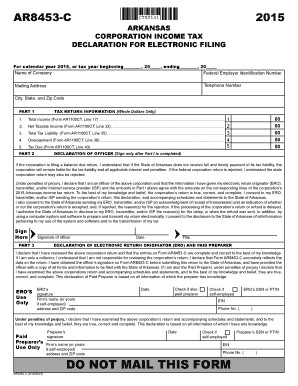
The AR AR8453-C is a crucial form for Arkansas corporation income tax declaration for electronic filing. This guide will walk you through the necessary steps to complete the form accurately and efficiently, ensuring your information is properly submitted to the state.
Follow the steps to complete your AR AR8453-C form online
- Press the ‘Get Form’ button to access the AR AR8453-C form and open it in your editor.
- Begin by entering the name of the company in the designated field. Make sure to fill out the tax year information, including the start and end date.
- Provide the federal employer identification number (FEIN) of the corporation in the corresponding section below the company's name.
- Fill in the telephone number and the complete mailing address, including the city, state, and zip code.
- Move on to Part 1 where you will need to input several figures from Form AR1100CT. Start with Total Income (Line 17), followed by Net Taxable Income (Line 32), Total Tax Liability (Line 35), Overpayment (Line 39), and Tax Due (Line 43). Ensure all amounts are in whole dollars.
- After completing Part 1, focus on the Declaration of Officer section. This is where an officer of the corporation must sign and date the form, certifying the accuracy of the information provided.
- If applicable, the ERO (electronic return originator) or paid preparer must complete the corresponding sections. They should sign, date, and provide necessary information such as their firm’s name, address, and identification numbers.
- Finally, review all entered information for accuracy, then save your form changes, download a copy, and prepare to electronically submit or share the completed document.
Complete your AR AR8453-C form online today to ensure timely filing and compliance.
If you use TurboTax Online, you can file one federal return with up to five state returns per Intuit Account. If you use TurboTax Desktop, you can e-file five federal returns with up to three state returns each. However, you can paper-file as many returns as you'd like.