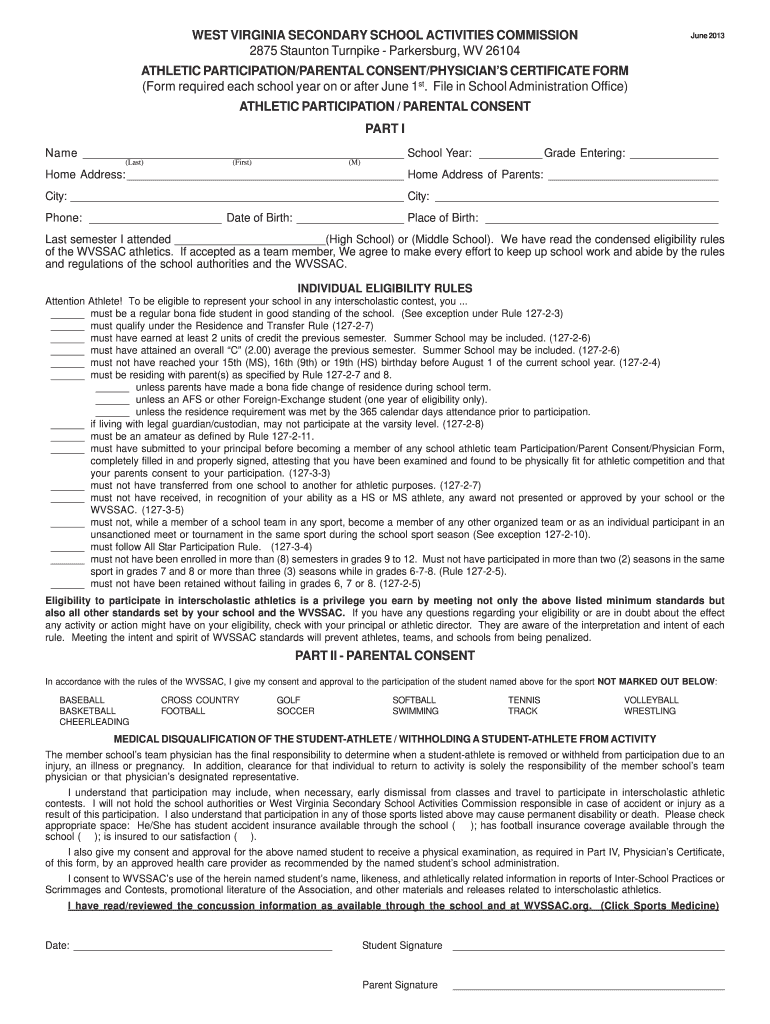
Each school year on or after June 1st. File in School Administration Office) ATHLETIC PARTICIPATION / PARENTAL CONSENT PART I Name ___________________________________________________ School Year: __________ Grade Entering: ______________ (Last) (First) (M) Home Address: ____________________________________________ Home Address of Parents: ___________________________ City: _____________________________________________________ City: _____________________________________________ Phone: _________.
Loading

Open form follow the instructions

Easily sign the form with your finger

Send filled & signed form or save
How to fill out the WV Athletic Participation/Parental Consent/Physician's Certificate Form online
This guide provides straightforward instructions for users on how to complete the WV Athletic Participation/Parental Consent/Physician's Certificate Form online. By following these steps, you will ensure that all necessary information is accurately recorded for your student-athlete's participation in school athletics.
Follow the steps to successfully complete the form online.
- Click ‘Get Form’ button to obtain the form and open it in the editor.
- Begin by entering the athlete's name, school year, and grade they are entering. These fields typically require the last name, first name, and middle initial.
- Provide the home address and parents' home address, including city, state, and any applicable phone numbers.
- Fill in the date of birth and place of birth, ensuring accuracy to avoid any eligibility issues.
- Indicate the last semester attended, specifying whether it was high school or middle school.
- Review the eligibility rules listed in the form. This section outlines criteria necessary to represent the school in athletics. Make sure the athlete meets these conditions.
- In Part II, the parent or guardian must provide consent for the athlete's participation in specified sports. They should check the appropriate boxes for sports they approve.
- Complete the medical disqualification section by marking if the athlete has student accident insurance and providing consent for a physical examination.
- For Part III, the parent or guardian should fill out the student's medical history, answering questions pertaining to past injuries and medical conditions.
- Fill in the vital signs section, entering the athlete's height, weight, pulse, and blood pressure as applicable.
- Section IV requires a screening physical exam to be completed by a physician. This includes checks for various physical aspects involving the mouth, skin, respiratory, and cardiovascular systems.
- Finally, in Part V, based on the physician's evaluation, provide recommendations along with the physician's signature and date.
- After completing all sections, ensure to save your changes, and you may download, print, or share the form as needed.
Complete your forms online to ensure a smooth process for your student-athlete's participation.
Experience a faster way to fill out and sign forms on the web. Access the most extensive library of templates available.
Related content
The documents shall include but not be limited to: Athletic Participation/Parental...
In accordance with the rules of the WVSSAC, I give my consent and approval to the...
May 9, 2008 — National Stroke Awareness. Month — May 2008. May is National Stroke...
Use professional pre-built templates to fill in and sign documents online faster. Get access to thousands of forms.
If you believe that this page should be taken down, please follow our DMCA take down process here.