Loading
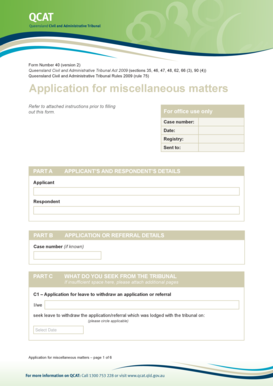
Get Au Qcat Form 40 2013
How it works
-

Open form follow the instructions
-

Easily sign the form with your finger
-

Send filled & signed form or save
How to fill out the AU QCAT Form 40 online
Filling out the AU QCAT Form 40 online is a straightforward process that facilitates applications for miscellaneous matters at the Queensland Civil and Administrative Tribunal. This guide provides step-by-step instructions to assist users in navigating the form with confidence, regardless of their legal background.
Follow the steps to fill out the AU QCAT Form 40 online effectively.
- Click the ‘Get Form’ button to access the form and open it in your chosen online editor.
- Fill in the applicant’s and respondent's details in Part A of the form. Ensure that all required information is complete and accurate.
- In Part B, provide the case number if known. This helps in referencing your application.
- For Part C, specify what you seek from the tribunal. Use the designated sections (C1 to C8) for different applications such as withdrawal requests or directions, ensuring to circle applicable options.
- If additional space is needed for any section, attach separate pages as required. Make sure to identify them as part of your application.
- Complete Part D by checking off the checklist to confirm that all questions have been answered and verify that you are ready to proceed with the application.
- Indicate if an interpreter is needed in the designated area. If yes, specify the required language.
- Sign and date the form, making sure that all applicants have signed if there is more than one.
- Once completed, save the changes, and utilize the options to download, print, or share the form as needed.
Start your application process today by filling out the AU QCAT Form 40 online.
Get form
Experience a faster way to fill out and sign forms on the web. Access the most extensive library of templates available.
Copying Conditional Formatting to Another Cell Click on the cell that has the conditional formatting you want to copy. Click Home > Format Painter. To paste the conditional formatting, drag the paintbrush across the cells or ranges of cells you want to format.
Get This Form Now!
Use professional pre-built templates to fill in and sign documents online faster. Get access to thousands of forms.