Loading
Get Request For Commercial Timesharing Services - Energy
How it works
-

Open form follow the instructions
-

Easily sign the form with your finger
-

Send filled & signed form or save
How to fill out the REQUEST FOR COMMERCIAL TIMESHARING SERVICES - Energy online
Filling out the REQUEST FOR COMMERCIAL TIMESHARING SERVICES - Energy form can seem complex, but with clear guidance, you can complete it successfully. This user-friendly guide will walk you through each section of the form, ensuring you provide the necessary information accurately and efficiently.
Follow the steps to successfully complete the form online.
- Click the ‘Get Form’ button to access the form and open it in your chosen editor.
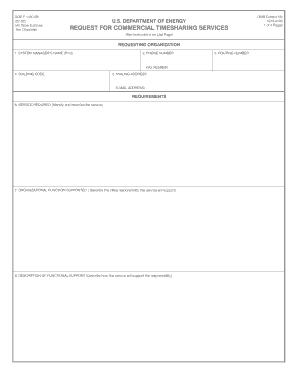
- Fill in the requesting organization’s details: Start by entering the full name of the system manager responsible for the service in the provided field.
- Provide contact information: Enter the system manager’s phone number and, if applicable, their fax number.
- Input the building code, mailing address, and email address associated with the requesting organization.
- Identify the service required: Clearly describe the commercial timesharing service that is needed, including any specific software aspects.
- Outline the organizational function supported: Detail the office function that the requested service will assist, ensuring to explain its relevance.
- Describe the functional support: Explain how the service will help fulfill the responsibilities mentioned in the previous step.
- Specify training requirements: List the training needed for users to effectively utilize the timesharing service.
- Detail documentation needs: Specify any required supporting documentation, such as user manuals or reference guides.
- Identify any additional technical assistance or analyst services required and the number of copies needed.
- Mention any other requirements: Include any other relevant details not previously covered.
- Provide planned expenditures: Break down the expected financial details of the service by fiscal year.
- List all users: Specify individuals authorized for service access, attaching a completed DOE Form 1450.5A for each person.
- Obtain the necessary signature: Have the DOE office director sign and date the form to validate the request.
- Finally, review all sections for accuracy, then save your changes, download, print, or share the completed form as needed.
Complete your REQUEST FOR COMMERCIAL TIMESHARING SERVICES - Energy form online today!
Industry-leading security and compliance
US Legal Forms protects your data by complying with industry-specific security standards.
-
In businnes since 199725+ years providing professional legal documents.
-
Accredited businessGuarantees that a business meets BBB accreditation standards in the US and Canada.
-
Secured by BraintreeValidated Level 1 PCI DSS compliant payment gateway that accepts most major credit and debit card brands from across the globe.