Loading
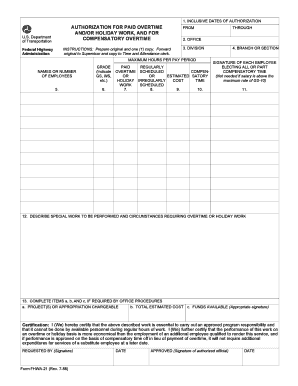
Get Informs - Fhwa21.wpf
How it works
-

Open form follow the instructions
-

Easily sign the form with your finger
-

Send filled & signed form or save
How to fill out the InForms - Fhwa21.wpf online
This guide provides clear and detailed instructions for users on how to fill out the InForms - Fhwa21.wpf online. By following these steps, users can ensure the accurate completion of the form necessary for authorization of paid overtime and holiday work.
Follow the steps to successfully complete the form.
- Press the ‘Get Form’ button to obtain the InForms - Fhwa21.wpf and open it in the editor where you can begin filling it out.
- In the 'Inclusive dates of authorization' section, enter the date range for which you are seeking authorization for paid overtime and/or holiday work.
- Fill in the 'Office' and 'Division' fields to identify the department responsible for processing the request.
- Indicate the maximum hours per pay period that the employees will be authorized for overtime in the respective section.
- List the names or numbers of the employees who are requesting authorization for overtime in the provided space.
- Specify the grade of each employee (for example, GS, WS) in the field designated for this information.
- In the section for estimating the costs, indicate the estimated cost for regular and scheduled overtime, compensatory time, and any holiday work as applicable.
- Each employee electing to take compensatory time should provide their signature in the allocated area. Note that this step is not required if the employee’s salary exceeds the maximum rate of GS-10.
- Describe the special work to be performed and the circumstances requiring overtime or holiday work in the relevant field.
- If required by office procedures, complete items a, b, and c regarding project(s) or appropriation chargeable, total estimated cost, and funds available, ensuring the appropriate signatures are obtained.
- Certification is necessary; sign to affirm that the work described is essential and that it cannot be performed during regular work hours.
- Finally, ensure to fill out the 'Requested by' field along with the date, and obtain the approval signature from the authorized official.
- Once all sections are completed, you can save changes, download, print, or share the completed form as needed.
Complete your InForms - Fhwa21.wpf online today for a smooth authorization process.
Industry-leading security and compliance
US Legal Forms protects your data by complying with industry-specific security standards.
-
In businnes since 199725+ years providing professional legal documents.
-
Accredited businessGuarantees that a business meets BBB accreditation standards in the US and Canada.
-
Secured by BraintreeValidated Level 1 PCI DSS compliant payment gateway that accepts most major credit and debit card brands from across the globe.